API testing
API测试
APIs (Application Programming Interfaces) enable software systems and applications to communicate and share data. API testing is important as vulnerabilities in APIs may undermine core aspects of a website’s confidentiality, integrity, and availability. API(应用程序编程接口)使软件系统和应用程序能够通信和共享数据。 API 测试很重要,因为 API 中的漏洞可能会破坏网站的机密性、完整性和可用性的核心方面。
All dynamic websites are composed of APIs, so classic web vulnerabilities like SQL injection could be classed as API testing. In this topic, we’ll teach you how to test APIs that aren’t fully used by the website front-end, with a focus on RESTful and JSON APIs. We’ll also teach you how to test for server-side parameter pollution vulnerabilities that may impact internal APIs. 所有动态网站都是由API组成的,因此像SQL注入这样的经典Web漏洞可以归类为API测试。在本主题中,我们将教您如何测试网站前端未完全使用的 API,重点是 RESTful 和 JSON API。我们还将教您如何测试可能影响内部 API 的服务器端参数污染漏洞。
To illustrate the overlap between API testing and general web testing, we’ve created a mapping between our existing topics and the OWASP API Security Top 10 2023. 为了说明 API 测试和一般 Web 测试之间的重叠,我们在现有主题和 2023 年 OWASP API 安全 Top 10 之间创建了映射。
API侦察
To start API testing, you first need to find out as much information about the API as possible, to discover its attack surface. 要开始 API 测试,您首先需要尽可能多地查找有关 API 的信息,以发现其攻击面。
To begin, you should identify API endpoints. These are locations where an API receives requests about a specific resource on its server. For example, consider the following GET request:
首先,您应该确定 API 端点。 API 在这些位置接收有关其服务器上特定资源的请求。例如,考虑以下 GET 请求:
GET /api/books HTTP/1.1
Host: example.com
The API endpoint for this request is /api/books. This results in an interaction with the API to retrieve a list of books from a library. Another API endpoint might be, for example, /api/books/mystery, which would retrieve a list of mystery books.
此请求的 API 端点是 /api/books。这会导致与 API 交互以从图书馆检索图书列表。例如,另一个 API 端点可能是 /api/books/mystery,它将检索神秘书籍的列表。
Once you have identified the endpoints, you need to determine how to interact with them. This enables you to construct valid HTTP requests to test the API. For example, you should find out information about the following: 确定端点后,您需要确定如何与它们交互。这使您能够构造有效的 HTTP 请求来测试 API。例如,您应该查找有关以下内容的信息:
- The input data the API processes, including both compulsory and optional parameters. API 处理的输入数据,包括强制参数和可选参数。
- The types of requests the API accepts, including supported HTTP methods and media formats. API 接受的请求类型,包括支持的 HTTP 方法和媒体格式。
- Rate limits and authentication mechanisms. 速率限制和身份验证机制。
APIs are usually documented so that developers know how to use and integrate with them. API 通常会被记录下来,以便开发人员知道如何使用它们并与其集成。
Documentation can be in both human-readable and machine-readable forms. Human-readable documentation is designed for developers to understand how to use the API. It may include detailed explanations, examples, and usage scenarios. Machine-readable documentation is designed to be processed by software for automating tasks like API integration and validation. It’s written in structured formats like JSON or XML. 文档可以采用人类可读和机器可读的形式。人类可读的文档旨在帮助开发人员了解如何使用 API。它可能包括详细的解释、示例和使用场景。机器可读文档旨在由软件处理,以实现 API 集成和验证等任务的自动化。它以 JSON 或 XML 等结构化格式编写。
API documentation is often publicly available, particularly if the API is intended for use by external developers. If this is the case, always start your recon by reviewing the documentation. API 文档通常是公开的,特别是当 API 供外部开发人员使用时。如果是这种情况,请务必通过查看文档来开始侦察。
发现API文档
Even if API documentation isn’t openly available, you may still be able to access it by browsing applications that use the API. 即使 API 文档不公开,您仍然可以通过浏览使用 API 的应用程序来访问它。
To do this, you can use Burp Scanner to crawl the API. You can also browse applications manually using Burp’s browser. Look for endpoints that may refer to API documentation, for example: 为此,您可以使用 Burp Scanner 来爬取 API。您还可以使用 Burp 的浏览器手动浏览应用程序。查找可能参考 API 文档的端点,例如:
/api/swagger/index.html/openapi.json
If you identify an endpoint for a resource, make sure to investigate the base path. For example, if you identify the resource endpoint /api/swagger/v1/users/123, then you should investigate the following paths:
如果您确定资源的端点,请确保调查基本路径。例如,如果您识别资源端点 /api/swagger/v1/users/123,那么您应该调查以下路径:
/api/swagger/v1/api/swagger/api
You can also use a list of common paths to find documentation using Intruder. 您还可以使用常用路径列表来查找使用 Intruder 的文档。
Lab 1 使用文档利用 API 端点
Exploiting an API endpoint using documentation
在测试中,会发现一个请求,
PATCH /api/user/wiener HTTP/2发送Repeter,删除 /wiener,
HTTP/2 400 Bad Request
Content-Type: application/json; charset=utf-8
X-Content-Type-Options: nosniff
X-Frame-Options: SAMEORIGIN
Content-Length: 50

{"error":"Malformed URL: expecting an identifier"}
这个报错翻译过来就是: 错误:格式错误的 URL:期望一个标识符。
再删除 /user,有趣的事情发生了,访问成功。
发现是一个交互式的API文档,点击DELETE栏,就可以进行删除用户名的操作。
使用机器可读的文档
You can use a range of automated tools to analyze any machine-readable API documentation that you find. 您可以使用一系列自动化工具来分析您找到的任何机器可读的 API 文档。
You can use Burp Scanner to crawl and audit OpenAPI documentation, or any other documentation in JSON or YAML format. You can also parse OpenAPI documentation using the OpenAPI Parser BApp. 您可以使用 Burp Scanner 来爬取和审核 OpenAPI 文档,或任何其他 JSON 或 YAML 格式的文档。您还可以使用 OpenAPI 解析器 BApp 解析 OpenAPI 文档。
You may also be able to use a specialized tool to test the documented endpoints, such as Postman or SoapUI. 您还可以使用专门的工具来测试记录的端点,例如 Postman 或 SoapUI。
识别 API 端点
You can also gather a lot of information by browsing applications that use the API. This is often worth doing even if you have access to API documentation, as sometimes documentation may be inaccurate or out of date. 您还可以通过浏览使用 API 的应用程序来收集大量信息。即使您有权访问 API 文档,这通常也是值得做的,因为有时文档可能不准确或过时。
You can use Burp Scanner to crawl the application, then manually investigate interesting attack surface using Burp’s browser. 您可以使用 Burp Scanner 抓取应用程序,然后使用 Burp 的浏览器手动调查有趣的攻击面。
While browsing the application, look for patterns that suggest API endpoints in the URL structure, such as /api/. Also look out for JavaScript files. These can contain references to API endpoints that you haven’t triggered directly via the web browser. Burp Scanner automatically extracts some endpoints during crawls, but for a more heavyweight extraction, use the JS Link Finder BApp. You can also manually review JavaScript files in Burp.
浏览应用程序时,在 URL 结构中查找建议 API 端点的模式,例如 /api/。还要注意 JavaScript 文件。这些可以包含对您未通过 Web 浏览器直接触发的 API 端点的引用。 Burp Scanner 在爬网期间自动提取一些端点,但对于更重量级的提取,请使用 JS Link Finder BApp。您还可以在 Burp 中手动查看 JavaScript 文件。
与 API 端点交互
Once you’ve identified API endpoints, interact with them using Burp Repeater and Burp Intruder. This enables you to observe the API’s behavior and discover additional attack surface. For example, you could investigate how the API responds to changing the HTTP method and media type. 确定 API 端点后,使用 Burp Repeater 和 Burp Intruder 与它们交互。这使您能够观察 API 的行为并发现其他攻击面。例如,您可以研究 API 如何响应 HTTP 方法和媒体类型的更改。
As you interact with the API endpoints, review error messages and other responses closely. Sometimes these include information that you can use to construct a valid HTTP request. 当您与 API 端点交互时,请仔细查看错误消息和其他响应。有时,这些信息包括可用于构造有效 HTTP 请求的信息。
识别支持的 HTTP 方法
The HTTP method specifies the action to be performed on a resource. For example: HTTP 方法指定要对资源执行的操作。例如:
GET- Retrieves data from a resource. - 从资源中检索数据。PATCH- Applies partial changes to a resource. - 对资源应用部分更改。OPTIONS- Retrieves information on the types of request methods that can be used on a resource. - 检索有关可在资源上使用的请求方法类型的信息。
An API endpoint may support different HTTP methods. It’s therefore important to test all potential methods when you’re investigating API endpoints. This may enable you to identify additional endpoint functionality, opening up more attack surface. API端点可以支持不同的HTTP方法。因此,在调查 API 端点时测试所有潜在方法非常重要。这可能使您能够识别其他端点功能,从而打开更多的攻击面。
For example, the endpoint /api/tasks may support the following methods:
例如,端点 /api/tasks 可能支持以下方法:
GET /api/tasks- Retrieves a list of tasks. - 检索任务列表。POST /api/tasks- Creates a new task. - 创建一个新任务。DELETE /api/tasks/1- Deletes a task. - 删除任务。
You can use the built-in HTTP verbs list in Burp Intruder to automatically cycle through a range of methods. 您可以使用 Burp Intruder 中内置的 HTTP 动词列表来自动循环使用一系列方法。
识别支持的内容类型
API endpoints often expect data in a specific format. They may therefore behave differently depending on the content type of the data provided in a request. Changing the content type may enable you to: API 端点通常需要特定格式的数据。因此,它们的行为可能会有所不同,具体取决于请求中提供的数据的内容类型。更改内容类型可以使您:
-
Trigger errors that disclose useful information. 触发泄露有用信息的错误。
-
Bypass flawed defenses.
绕过有缺陷的防御。
-
Take advantage of differences in processing logic. For example, an API may be secure when handling JSON data but susceptible to injection attacks when dealing with XML. 利用处理逻辑的差异。例如,API 在处理 JSON 数据时可能是安全的,但在处理 XML 时容易受到注入攻击。
To change the content type, modify the Content-Type header, then reformat the request body accordingly. You can use the Content type converter BApp to automatically convert data submitted within requests between XML and JSON.
要更改内容类型,请修改 Content-Type 标头,然后相应地重新格式化请求正文。您可以使用内容类型转换器 BApp 自动在 XML 和 JSON 之间转换请求中提交的数据。
Lab 2 查找并利用未使用的 API 端点
Finding and exploiting an unused API endpoint
先看看 查看商品 这个请求与响应:
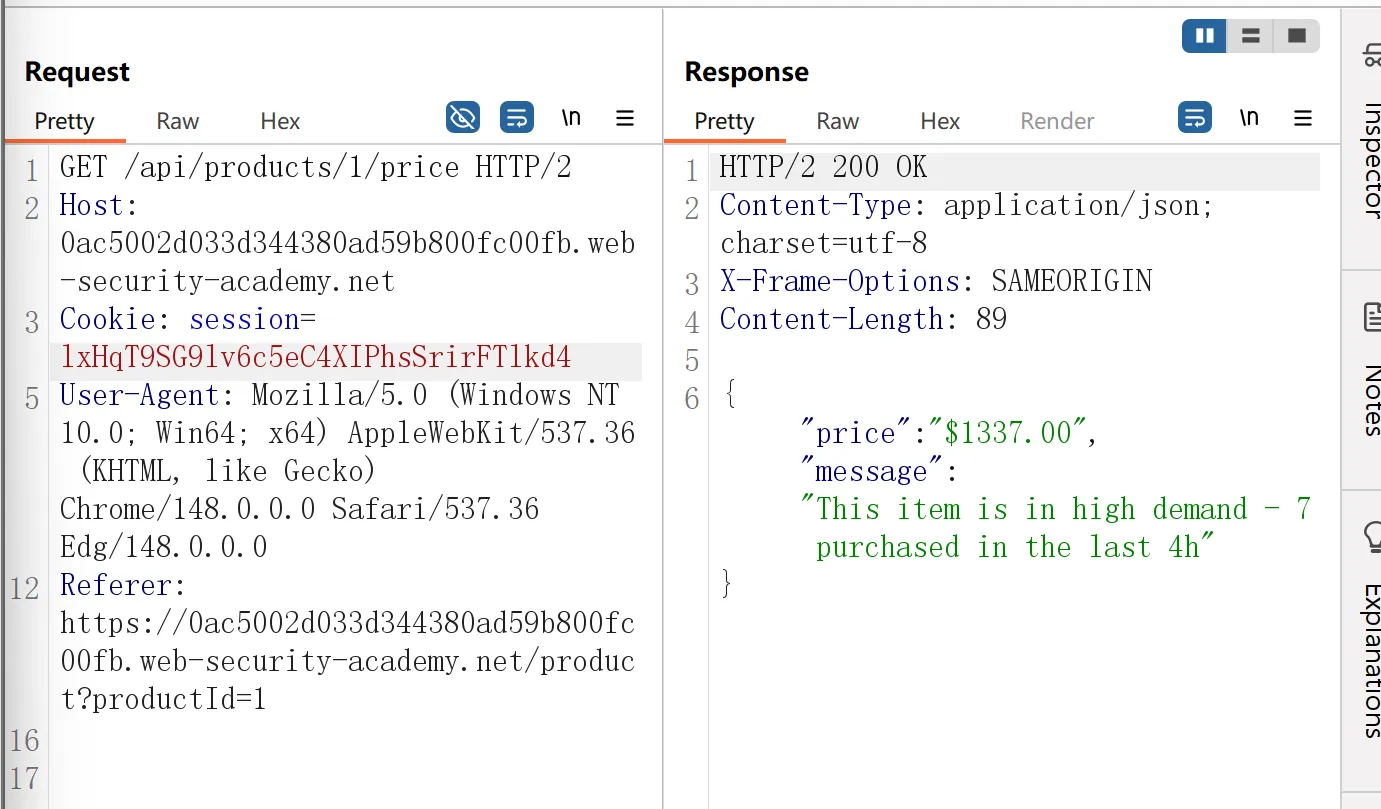
发现 响应 通过json返回了价格。
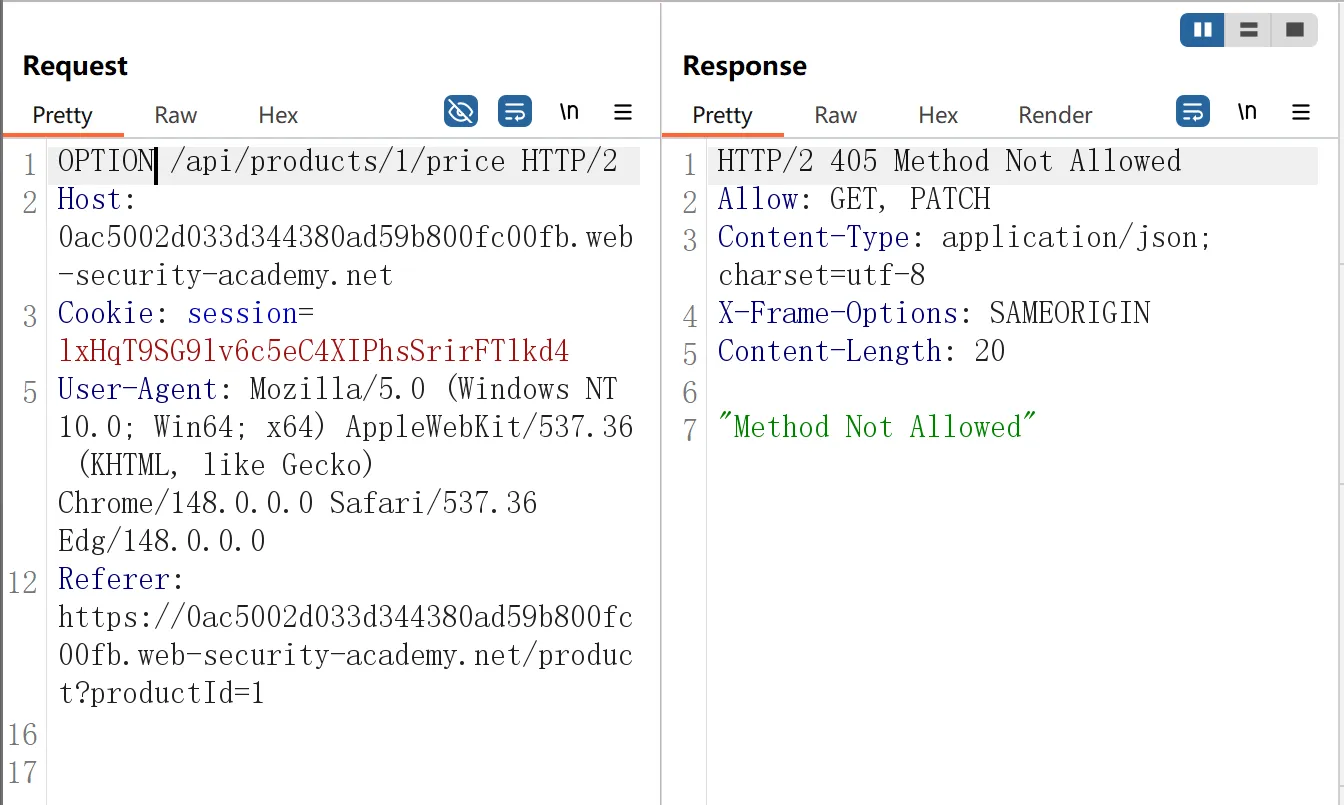
再通过这个,可以发现允许 GET 和 PATCH。
[!IMPORTANT]
请求方式
方法 作用 是否修改数据 数据范围 常见用途 参数位置 GET获取资源 否 读取全部或指定数据 查询用户、获取文章、拉取列表 URL 参数 POST创建资源 是 新增数据 注册、提交表单、上传数据 请求体 Body PUT整体替换资源 是 覆盖整个对象 更新完整用户信息 请求体 Body PATCH部分修改资源 是 只更新部分字段 改昵称、改密码、改权限 请求体 Body DELETE删除资源 是 删除指定数据 删除文章、删除用户 URL 参数
所以我们试试能否通过这种方式修改 price,
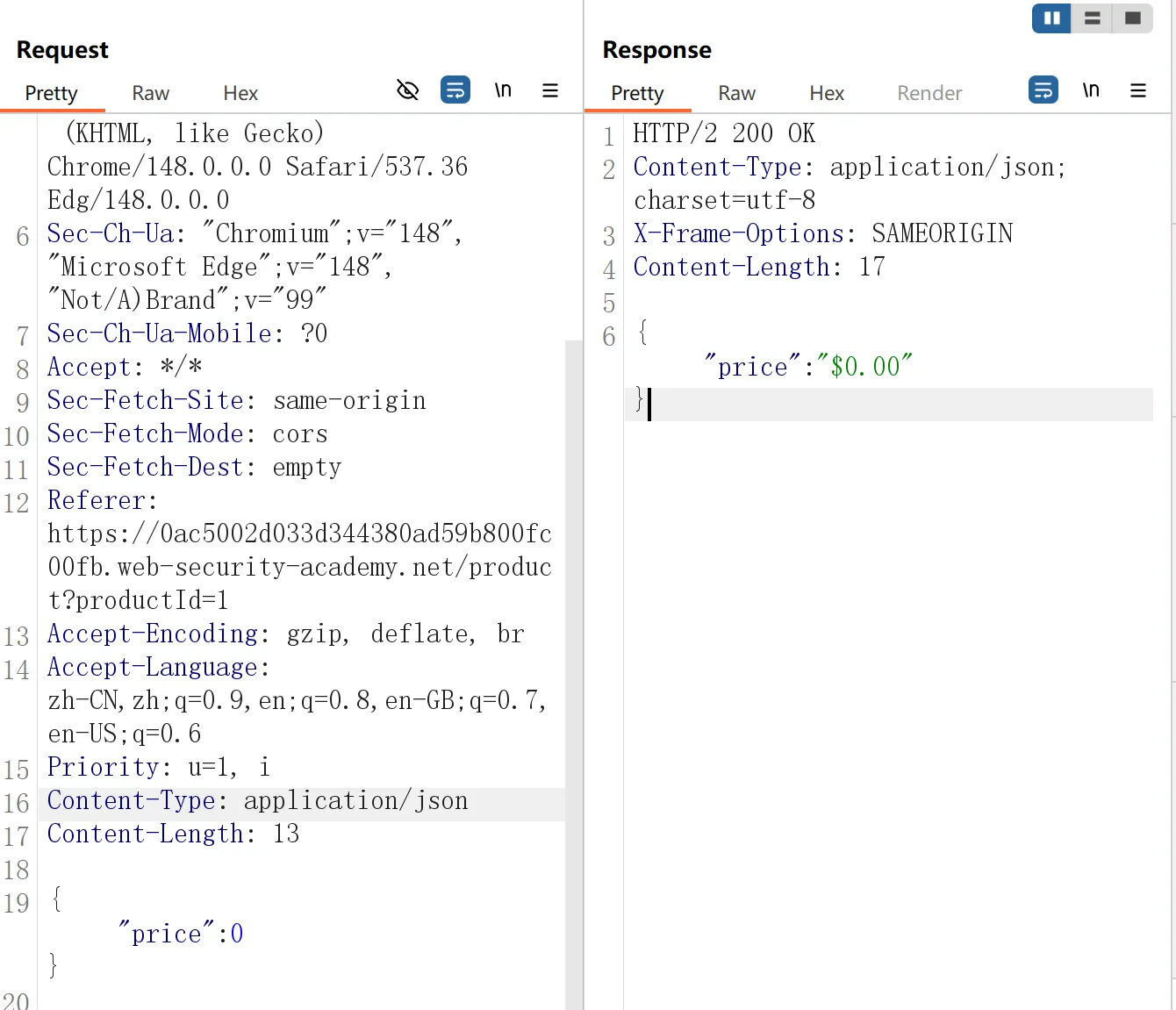
发现成功以$0的方式,进入了皮夹克页面。
使用 Intruder 查找隐藏端点
Once you have identified some initial API endpoints, you can use Intruder to uncover hidden endpoints. For example, consider a scenario where you have identified the following API endpoint for updating user information: 一旦确定了一些初始 API 端点,您就可以使用 Intruder 来发现隐藏的端点。例如,考虑一个场景,您已确定以下 API 端点用于更新用户信息:
PUT /api/user/updateTo identify hidden endpoints, you could use Burp Intruder to find other resources with the same structure. For example, you could add a payload to the /update position of the path with a list of other common functions, such as delete and add.
要识别隐藏端点,您可以使用 Burp Intruder 来查找具有相同结构的其他资源。例如,您可以使用其他常用功能(例如删除和添加)列表将有效负载添加到路径的 /update 位置。
When looking for hidden endpoints, use wordlists based on common API naming conventions and industry terms. Make sure you also include terms that are relevant to the application, based on your initial recon. 查找隐藏端点时,请使用基于常见 API 命名约定和行业术语的单词列表。根据您的初步调查,确保您还包含与应用程序相关的条款。
寻找隐藏参数
When you’re doing API recon, you may find undocumented parameters that the API supports. You can attempt to use these to change the application’s behavior. Burp includes numerous tools that can help you identify hidden parameters: 当您进行 API 侦察时,您可能会发现 API 支持的未记录参数。您可以尝试使用它们来更改应用程序的行为。 Burp 包含许多可以帮助您识别隐藏参数的工具:
- Burp Intruder enables you to automatically discover hidden parameters, using a wordlist of common parameter names to replace existing parameters or add new parameters. Make sure you also include names that are relevant to the application, based on your initial recon. Burp Intruder 使您能够自动发现隐藏参数,使用常用参数名称的单词列表来替换现有参数或添加新参数。根据您的初步调查,确保您还包含与应用程序相关的名称。
- The Param miner BApp enables you to automatically guess up to 65,536 param names per request. Param miner automatically guesses names that are relevant to the application, based on information taken from the scope. Param miner BApp 使您能够自动猜测每个请求最多 65,536 个参数名称。参数挖掘器根据从范围中获取的信息自动猜测与应用程序相关的名称。
- The Content discovery tool enables you to discover content that isn’t linked from visible content that you can browse to, including parameters. 内容发现工具使您能够发现未与您可以浏览到的可见内容链接的内容,包括参数。
批量分配漏洞
Mass assignment (also known as auto-binding) can inadvertently create hidden parameters. It occurs when software frameworks automatically bind request parameters to fields on an internal object. Mass assignment may therefore result in the application supporting parameters that were never intended to be processed by the developer. 批量分配(也称为自动绑定)可能会无意中创建隐藏参数。当软件框架自动将请求参数绑定到内部对象上的字段时,就会发生这种情况。因此,批量分配可能会导致应用程序支持开发人员从未打算处理的参数。
识别隐藏参数
Since mass assignment creates parameters from object fields, you can often identify these hidden parameters by manually examining objects returned by the API. 由于批量分配会从对象字段创建参数,因此您通常可以通过手动检查 API 返回的对象来识别这些隐藏参数。
For example, consider a PATCH /api/users/ request, which enables users to update their username and email, and includes the following JSON:
例如,考虑 PATCH /api/users/ 请求,该请求使用户能够更新其用户名和电子邮件,并包含以下 JSON:
{
	"username": "wiener",
	"email": "wiener@example.com",
}
A concurrent GET /api/users/123 request returns the following JSON:
并发 GET /api/users/123 请求返回以下 JSON:
{
	"id": 123,
	"name": "John Doe",
	"email": "john@example.com",
	"isAdmin": "false"
}
This may indicate that the hidden id and isAdmin parameters are bound to the internal user object, alongside the updated username and email parameters.
这可能表明隐藏的 id 和 isAdmin 参数与更新的用户名和电子邮件参数一起绑定到内部用户对象。